Type your words once and see them in 24 copy and paste styles, from bold and script to bubble letters, boxed letters, fullwidth and strikethrough.
Runs in your browser. Nothing you type is sent anywhere.

This fancy text generator turns plain letters into 24 Unicode styles at once, from bold and italic to script, gothic, bubble letters, boxed letters and strikethrough. It is for anyone who wants a styled name, bio or post on a site that only allows plain text. Every style has its own copy button, and you paste the result like normal text.
What Is a Fancy Text Generator and How Does It Work?
A fancy text generator swaps each normal letter for a look-alike Unicode character, so the style survives copy and paste. For example, the letter A (U+0041) becomes Mathematical Bold A at U+1D400, which is 119,743 code points higher. Typing “Hello World 42” here gives 24 styles, including 𝐇𝐞𝐥𝐥𝐨 𝐖𝐨𝐫𝐥𝐝 𝟒𝟐 in bold.
How Does Fancy Text Work Without a Font?
Fancy text works because each styled letter is a different character, not a different font, so it keeps its look wherever Unicode is shown.
Unicode is the global standard that gives every character a number called a code point. Plain A is U+0041. The Mathematical Alphanumeric Symbols block (U+1D400 to U+1D7FF) holds full A to Z sets in bold, italic, script, fraktur, double struck, sans serif and monospace, made for maths formulas. The Enclosed Alphanumerics blocks add circled, squared and parenthesized letters. Fullwidth forms come from East Asian typing, where each Latin letter takes the width of one Chinese character. The tool simply adds a fixed offset to each letter:
styled code point = style start + (letter code point − 97) for a to z
bold A = U+1D400 + (65 − 65) = U+1D400
A few letters were already in the older Letterlike Symbols block, so the tool uses those instead. Script capital H is ℋ (U+210B) and double struck capital R is ℝ (U+211D). The line styles work differently: they add a combining character after each letter, such as U+0336 for strikethrough, which the screen draws on top of the letter before it.
Which Fancy Text Styles Support Numbers?
Only some styles have digits: bold, double struck, sans serif, sans bold, monospace, circled, negative circled, fullwidth and parenthesized (1 to 9 only). Other styles leave numbers plain.
| Style | Example of “Zone 42” | Starts at | Digits |
|---|---|---|---|
| Bold | 𝐙𝐨𝐧𝐞 𝟒𝟐 | U+1D400 | Yes |
| Italic | 𝑍𝑜𝑛𝑒 42 | U+1D434 | No |
| Script | 𝒵ℴ𝓃ℯ 42 | U+1D49C | No |
| Fraktur | ℨ𝔬𝔫𝔢 42 | U+1D504 | No |
| Double struck | ℤ𝕠𝕟𝕖 𝟜𝟚 | U+1D538 | Yes |
| Monospace | 𝚉𝚘𝚗𝚎 𝟺𝟸 | U+1D670 | Yes |
| Circled | Ⓩⓞⓝⓔ ④② | U+24B6 | Yes |
| Negative squared | 🆉🅾🅽🅴 42 | U+1F170 | No |
| Fullwidth | Zone 42 | U+FF21 | Yes |
| Small caps | ᴢᴏɴᴇ 42 | Mixed | No |
Squared and negative styles only have capital letters, so lowercase input is shown in capitals. Small caps has no true Q or X, so the tool uses ǫ and a plain x. For a single style with more options, try the bold text generator, the cursive text generator for handwriting styles, or the small text generator for tiny superscript letters.
Is Fancy Text Bad for Accessibility and Search?
Yes, it can be, because a screen reader may read each styled letter by its full name, such as “mathematical bold capital H”, or skip it.
Search engines and site search also treat 𝐇𝐞𝐥𝐥𝐨 as different characters from Hello, so people may not find your name or post. Use fancy text for a short accent, like one word in a bio, and keep key details in plain letters. If you just need different letter case, the case converter changes text without leaving plain Unicode letters.
Why Do Some Fancy Letters Show as Boxes?
Boxes, often called tofu, appear when the device has no font that contains that character. Bold, italic and circled letters show on nearly all modern phones and computers. Negative squared letters and some combining lines can fail on older Android or Windows versions, so check the result on the device your readers use.
Worked Example
A gamer wants a styled tag for a profile that allows 20 characters. Type Zone 42 in the tool. It counts 7 characters and 6 letters and digits styled. Bold gives 𝐙𝐨𝐧𝐞 𝟒𝟐 with styled digits, while circled gives Ⓩⓞⓝⓔ ④② and negative squared gives 🆉🅾🅽🅴 42 with plain digits. The strikethrough style adds one combining mark after each of the 7 characters, so it is 14 code points long. Pick a style, press its Copy button and paste it into the profile.
How Do You Use the Fancy Text Generator?
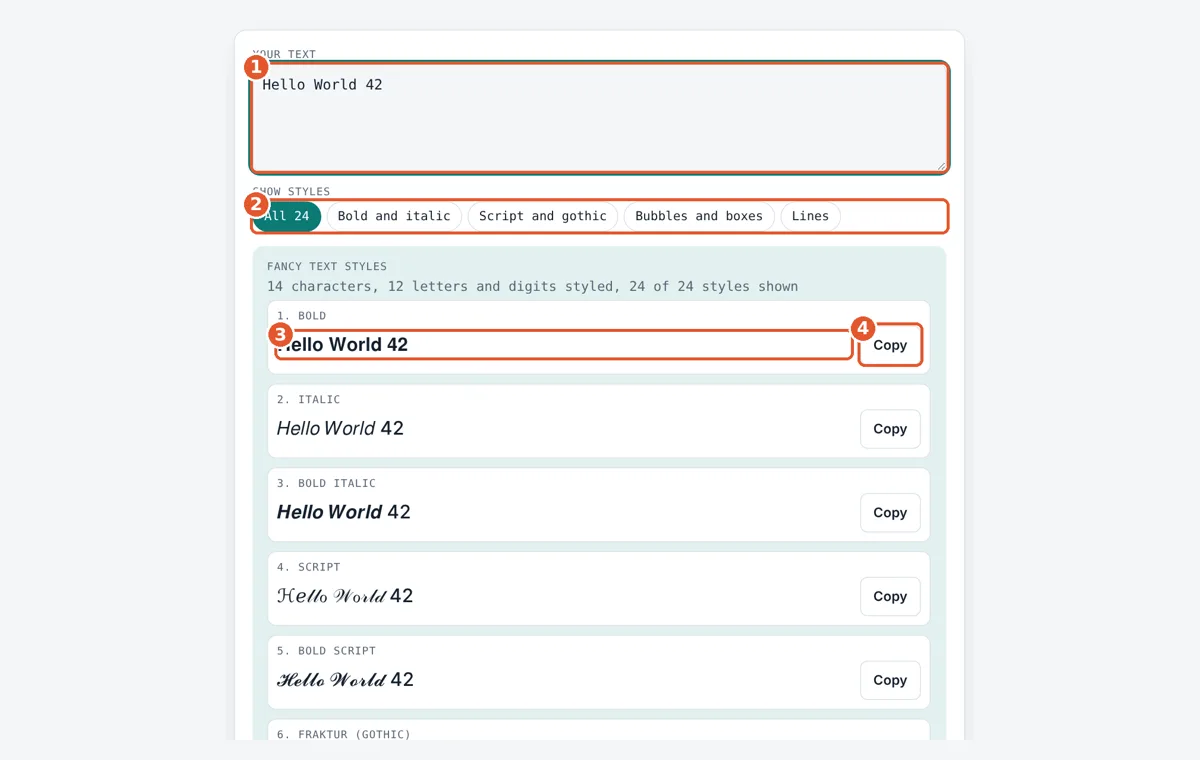
Type your text
Type or paste your words into the Your text box. Up to 2,000 characters work.
Filter the styles
Pick a group such as Script and gothic, or keep All 24 to see every style.
Compare the results
Each card shows your text in one style, updated live as you type.
Copy and paste
Press Copy on the style you like, then paste it into your bio, post or chat.
Frequently Asked Questions
Can I use fancy text on Instagram and TikTok?
Yes. Bios, captions and comments on Instagram, TikTok, X and Discord accept these Unicode characters because they are text, not images. Display names sometimes block a few symbols, so test the style before saving your profile.
Why do some letters stay plain in a style?
Some Unicode styles do not include every character. Italic, script and fraktur have no digits, and squared styles have no lowercase. Punctuation, accents and emoji are never changed, so the tool leaves them exactly as you typed them.
Does fancy text count as more characters?
Often, yes. Each bold or script letter is one character on screen but two UTF-16 code units, so a 10 letter word can count as 20 on sites with strict limits. Strikethrough and underline add a second code point to every character.
Can I turn fancy text back into normal text?
Yes, but you need to reverse the mapping, because the styled letters are different characters. Retyping is often fastest for short text. Some tools use Unicode NFKC normalization, which turns 𝐇𝐞𝐥𝐥𝐨 and Hello back into Hello.
Is it safe to use fancy text in my name?
It is safe in the sense that nothing harmful is added, but it can make you harder to find. Search boxes, tags and screen readers may not match 𝐀𝐧𝐧𝐚 to Anna. Keep your real name plain somewhere on the profile.
How many fancy text styles does this tool make?
It makes 24 styles: 13 bold, italic, script, fraktur, double struck, sans serif and monospace variants, 6 circled, squared, parenthesized and fullwidth styles, small caps, and 4 line styles such as strikethrough and underline.
Sources and Further Reading
- Unicode chart: Mathematical Alphanumeric Symbols (U+1D400 to U+1D7FF)
- Unicode chart: Enclosed Alphanumerics (U+2460 to U+24FF)
- Unicode chart: Enclosed Alphanumeric Supplement (U+1F100 to U+1F1FF)
- Unicode chart: Halfwidth and Fullwidth Forms (U+FF00 to U+FFEF)
Related Tools
Last reviewed: October 2026