Type your text once and get three tiny styles side by side, superscript, subscript and small caps, each ready to copy and paste where normal formatting is not allowed.
Runs in your browser. Nothing you type is sent anywhere.
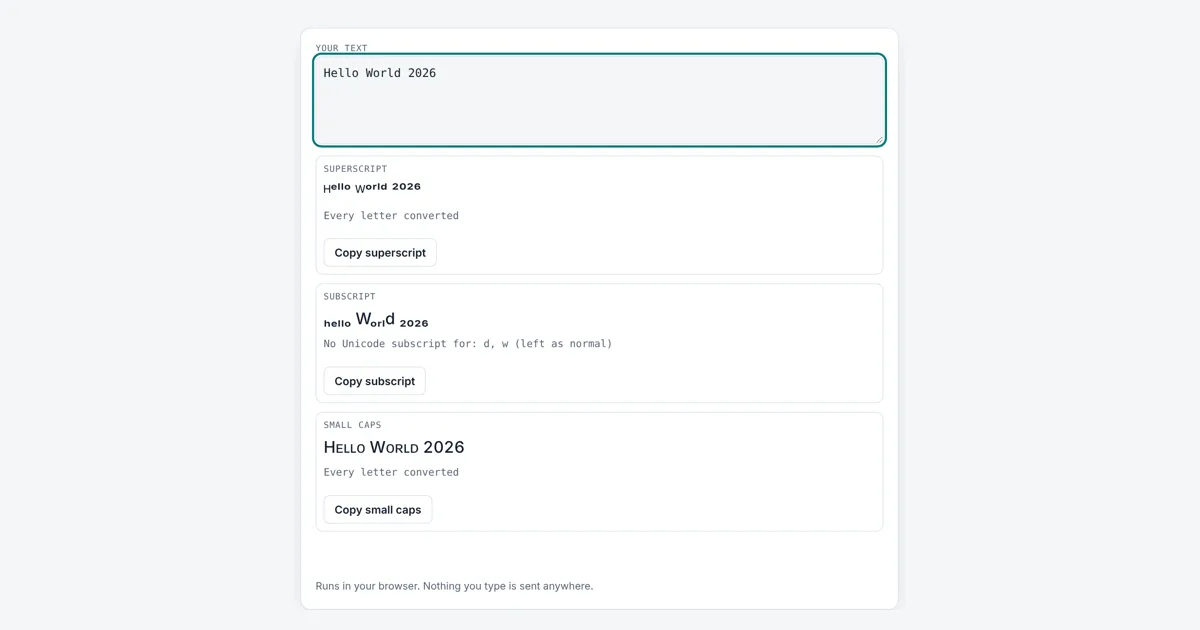
This small text generator is for anyone writing a social bio, a username, a game nickname or a chat message where you cannot change the font size. It swaps each letter for a matching small character from the Unicode standard, so the result stays tiny wherever you paste it, and it tells you which letters have no small version.
How Does Small Text Work?
Small text works by replacing normal letters with separate Unicode characters that are drawn smaller, not by changing the font size. For example, “Hello World 2026” becomes ᴴᵉˡˡᵒ ᵂᵒʳˡᵈ ²⁰²⁶ in superscript and Hᴇʟʟᴏ Wᴏʀʟᴅ 2026 in small caps. Each tiny letter is a real character, so it copies and pastes like any text.
Which Letters Have No Small Text Version?
In superscript only q has no widely supported Unicode character, in subscript b, c, d, f, g, q, w, y and z are missing, and in small caps q and x are missing.
The Unicode standard never set out to make a full tiny alphabet. Most superscript letters are modifier letters taken from the International Phonetic Alphabet (IPA) and dictionary sound guides, which is why the set has gaps. The capital superscripts C, F, Q, S, X, Y and Z are missing or very new, so the tool uses the lowercase superscript for those. Newer characters for superscript q and small cap q exist, but many phones and fonts still show them as empty boxes, so this tool leaves q unchanged and tells you.
| Style | Letters covered | Missing | Digits and + − = ( ) |
|---|---|---|---|
| Superscript | 25 of 26 | q | yes |
| Subscript | 17 of 26 | b c d f g q w y z | yes |
| Small caps | 24 of 26 | q x | not needed |
What Is the Difference Between Superscript, Subscript and Small Caps?
Superscript text sits above the line like the 2 in x², subscript text sits below the line like the 2 in H₂O, and small caps are capital letter shapes at lowercase height.
Superscript is used for powers, footnote marks and ordinal endings. Subscript is used in chemical formulas and maths indices. Small caps keep a calm, formal look and are common in headings and names; capitals you type stay full size, so the first letter of each word still stands out. For heavy text instead of tiny text, try the bold text generator, or flip a message with the upside down text generator.
Does Small Text Work on Instagram, TikTok and Discord?
Yes, small text works on most apps that accept plain text, because each character is a standard Unicode code point and not a formatting style.
A few older fonts may show a missing character as a box. Screen readers often read modifier letters oddly, so keep key information such as names or links in normal text. Character limits count each tiny letter as one or more characters; check the length with the character counter before you post.
Worked Example
Type Hello World 2026. The superscript card shows ᴴᵉˡˡᵒ ᵂᵒʳˡᵈ ²⁰²⁶ and says every letter converted. The subscript card shows ₕₑₗₗₒ Wₒᵣₗd ₂₀₂₆ with the note “No Unicode subscript for: d, w”, because those two letters have no subscript form. The small caps card shows Hᴇʟʟᴏ Wᴏʀʟᴅ 2026. Typing H2O gives ᴴ²ᴼ in superscript and ₕ₂ₒ in subscript, while the chemistry style H₂O needs a normal H and O with only the 2 lowered.
How Do You Use the Small Text Generator?
Type or paste your text
Enter any words, numbers or symbols in the box. Up to 5,000 characters.
Read the superscript
The first card shows your text raised and tiny, with any missing letters listed.
Check subscript and small caps
The next cards show lowered text and small capital letters for the same input.
Copy the style you like
Press the copy button under a card and paste the text into your bio, post or chat.

Frequently Asked Questions
Why is there no small q?
Unicode has no widely supported superscript q, subscript q or small capital q. Newer code points exist for some of them, but many phones and fonts cannot display them yet, so this tool keeps a normal q rather than risk an empty box.
Will small text change my font size in Word?
No. These are separate characters, not formatting, so they look small anywhere. In Word or Google Docs you can also use the built in superscript button, which keeps normal letters and is better for screen readers.
How do I type x squared with small text?
Type x2 and copy the superscript result, ˣ². For a cleaner maths look, keep the x normal and paste only the raised ², giving x². The same works for cubes with ³.
Does small text count as more characters?
Most tiny letters count as one character, the same as a normal letter, because they sit in the Basic Multilingual Plane. Some apps count by bytes, where each tiny letter uses 2 or 3 bytes instead of 1.
Can I use small text in a username?
Many apps block Unicode symbols in usernames and allow only letters, numbers and a few marks. Display names and bios are usually more relaxed. Test it in the app, since rules differ by platform.
Is small text the same as a small font?
No. A small font shrinks normal letters through styling, which is lost when you copy plain text. Small text uses its own characters, so the tiny look survives copy and paste into places with no font options.
Sources and Further Reading
- Unicode Consortium: Superscripts and Subscripts chart (U+2070)
- Unicode Consortium: Phonetic Extensions chart (U+1D00)
- Unicode Consortium: Spacing Modifier Letters chart (U+02B0)
Related Tools
Last reviewed: October 2026