Type a name or a short line and get it back in two cursive styles, script and bold script, ready to copy into a bio, caption or message.
Runs in your browser. Nothing you type is sent anywhere.
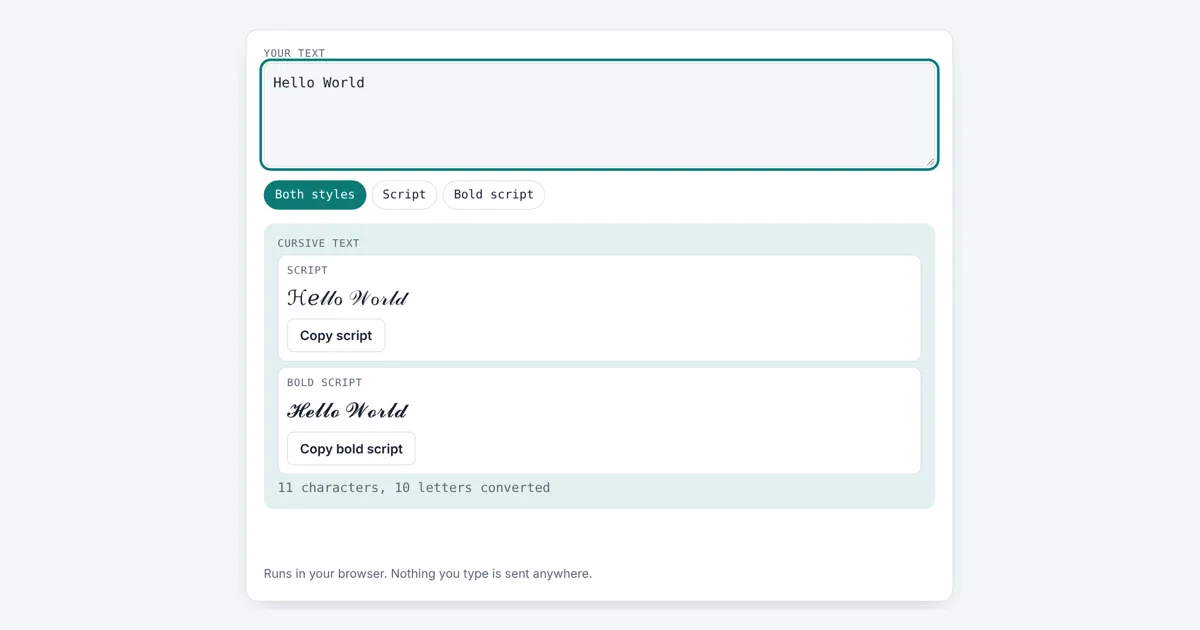
This cursive text generator swaps each A to Z letter for a matching handwriting style character from Unicode, the standard that gives every character a number. It is for anyone who wants a fancy name in a social bio, a game profile or a chat, without installing a font. You get two styles and one tap copy buttons.
How Does a Cursive Text Generator Work?
A cursive text generator replaces each normal letter with a script letter from the Unicode Mathematical Alphanumeric Symbols block. Typing “Hello World” gives ℋℯ𝓁𝓁ℴ 𝒲ℴ𝓇𝓁𝒹 in script or 𝓗𝓮𝓵𝓵𝓸 𝓦𝓸𝓻𝓵𝓭 in bold script. These are real characters, not a font, so the look survives copy and paste into most apps.
Is Cursive Text a Font or Real Characters?
Cursive text from this tool is made of real characters, not a font, so it keeps its shape wherever you paste it. Each character has its own code point, a unique number such as U+1D4B6 for script small a. The letters live in the Mathematical Alphanumeric Symbols block (U+1D400 to U+1D7FF), which the Unicode Consortium added for maths notation, where a script letter can mean something different from a plain one.
script small = U+1D4B6 + (letter position)
bold script capital = U+1D4D0 + (letter position)
bold script small = U+1D4EA + (letter position)
Why Do Some Cursive Letters Look Different From the Rest?
Eleven script letters come from an older block, so your font may draw them in a slightly different style. Before the maths block existed, Unicode already had ℬ, ℰ, ℱ, ℋ, ℐ, ℒ, ℳ, ℛ, ℯ, ℊ and ℴ in the Letterlike Symbols block (U+2100 to U+214F). To avoid duplicates, the matching spots in the maths block were left empty on purpose, and the tool fills them with these older letters. Bold script has no gaps, so every bold letter matches.
| Letter | Script | Code point | Block |
|---|---|---|---|
| A | 𝒜 | U+1D49C | Maths |
| B | ℬ | U+212C | Letterlike |
| E | ℰ | U+2130 | Letterlike |
| F | ℱ | U+2131 | Letterlike |
| H | ℋ | U+210B | Letterlike |
| I | ℐ | U+2110 | Letterlike |
| L | ℒ | U+2112 | Letterlike |
| M | ℳ | U+2133 | Letterlike |
| R | ℛ | U+211B | Letterlike |
| e | ℯ | U+212F | Letterlike |
| g | ℊ | U+210A | Letterlike |
| o | ℴ | U+2134 | Letterlike |
| z | 𝓏 | U+1D4CF | Maths |
Where Can You Use Cursive Text?
You can paste cursive text almost anywhere that accepts normal typed text, such as social bios, captions, comments, chat apps and game display names. It usually fails in usernames and handles, because those fields often allow only plain letters, numbers and a few symbols. Some older phones or fonts show empty boxes instead of letters. For a heavier look try the bold text generator, and for a playful flip use the upside down text generator.
Is Cursive Text Bad for Accessibility?
Yes, cursive Unicode text can be hard for people who use a screen reader, the software that reads the screen aloud for blind and low vision users. Because each letter is a maths symbol, a screen reader may skip it or read out long names letter by letter instead of the word. Search engines and in app search may also not match it to the plain word. Use it for a short name or one decorative line, and keep key details like your contact info and links in normal text.
Each script letter also takes two UTF-16 units instead of one, so a field with a strict limit can fill up faster than you expect. Check the length with the character counter before you paste into a tight bio box.
Worked Example
Maya wants her name in a profile bio. She types Maya Rose. The script style gives ℳ𝒶𝓎𝒶 ℛℴ𝓈ℯ, where ℳ, ℛ, ℴ and ℯ come from the Letterlike Symbols block and the rest from the maths block. The bold script style gives 𝓜𝓪𝔂𝓪 𝓡𝓸𝓼𝓮. The tool reports 9 characters with 8 letters converted, because the space stays a normal space. Typing Abc 123! shows that only letters change: 𝒜𝒷𝒸 123!
How Do You Use the Cursive Text Generator?
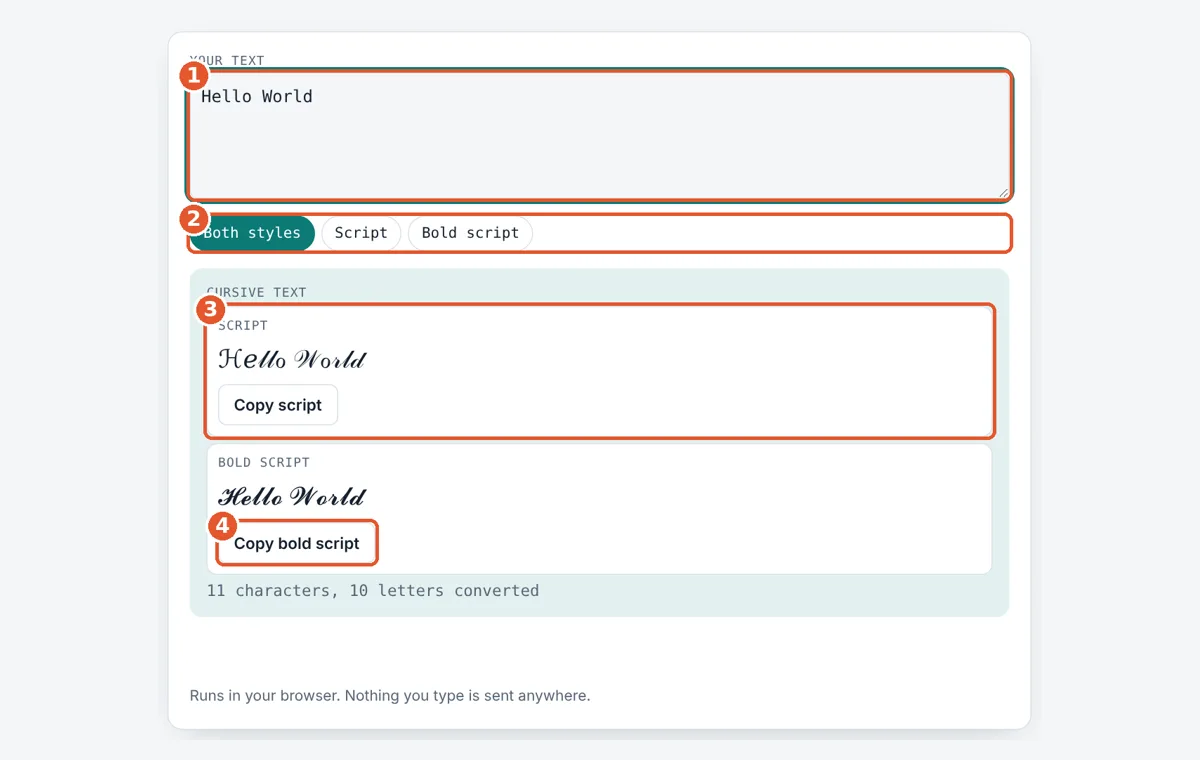
Type your text
Enter a name or short line in the Your text box. The result updates as you type.
Pick a style
Choose Both styles, Script or Bold script to show the version you want.
Check the result
Read the cursive text and the count of characters and converted letters.
Copy and paste
Tap the copy button under a style, then paste it into your bio, post or chat.
Frequently Asked Questions
Can I use cursive text in my Instagram or TikTok bio?
Usually yes. Bios and captions accept most Unicode characters, so script letters like 𝒜 and 𝓐 display for most viewers. Usernames are different, since they normally allow only plain letters, numbers, periods and underscores, so cursive letters will be rejected there.
Why do I see boxes instead of cursive letters?
Boxes appear when the device has no font that contains the maths script characters. This happens on some older phones and computers. The text is still correct underneath, and it will show properly on a device with a newer font such as one that supports Unicode maths symbols.
Does cursive text work with numbers?
No. Unicode has no script versions of the digits 0 to 9, so numbers, spaces and punctuation stay as they are. For example, Abc 123! becomes 𝒜𝒷𝒸 123! with only the three letters changed.
Will Google read my cursive text?
Search engines may treat script letters as symbols, not as the plain word, so text written as 𝒮𝒽ℴ𝓅 may not match a search for shop. Keep page titles, product names and important keywords in normal letters and use cursive only for decoration.
What is the difference between script and bold script?
Script uses thin, flowing letters from U+1D49C, plus 11 letters from the Letterlike Symbols block. Bold script uses thicker letters from U+1D4D0 and has all 52 upper and lower case letters in one place, so its style looks more even.
Can I turn cursive text back into normal text?
Yes, but not by changing the font. You need a tool or script that maps each code point back to its plain letter, for example U+1D4B6 back to a. The easiest way is to keep your original text and edit that, then convert it again.
Sources and Further Reading
- Unicode chart: Mathematical Alphanumeric Symbols (U+1D400 to U+1D7FF)
- Unicode chart: Letterlike Symbols (U+2100 to U+214F)
- Unicode Technical Report #25: Unicode Support for Mathematics
Related Tools
Last reviewed: October 2026