Pick what all crawlers may visit, choose a rule for each search and AI crawler, add your sitemap and get a ready robots.txt file, then test any path against it.
Runs in your browser. Nothing you type is sent anywhere. Back up your current robots.txt before you replace it.
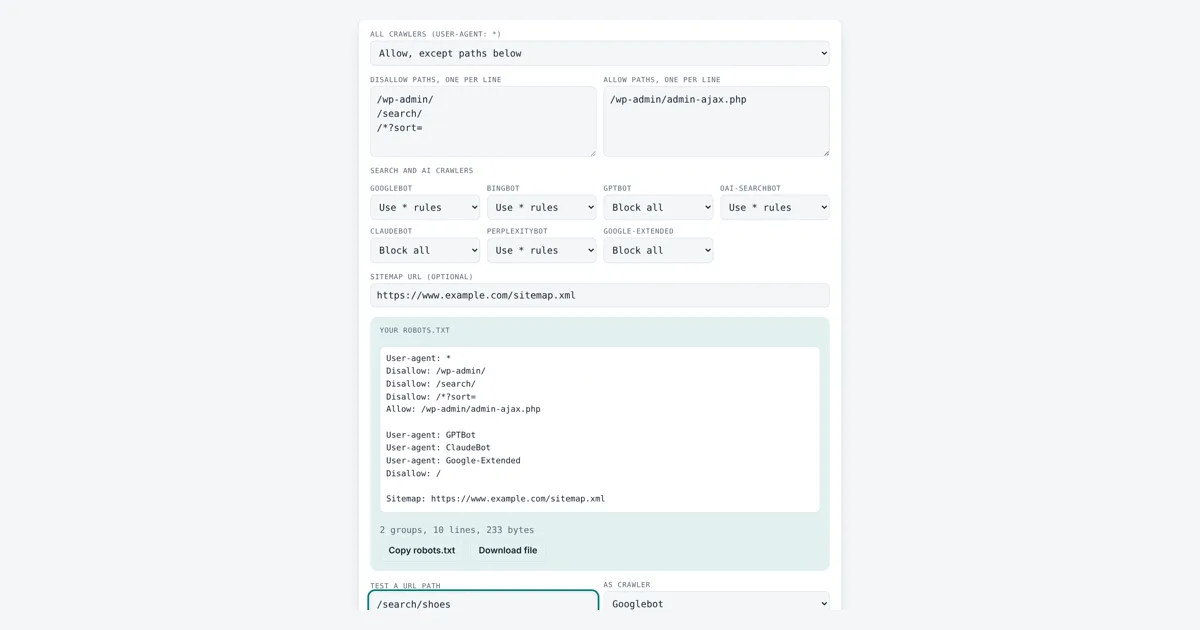
This robots txt generator is for site owners and developers who want a correct robots.txt without learning every rule by heart. You get user-agent groups for all crawlers and for named bots, Disallow and Allow lines, a sitemap line, a download and a path tester that uses Google’s longest match rule. The output follows RFC 9309, the Robots Exclusion Protocol standard published by the IETF in 2022.
What Should a Robots.txt File Contain?
A robots.txt file holds groups of rules, each starting with a User-agent line, followed by Disallow and Allow paths and an optional Sitemap line. For example, “User-agent: GPTBot” with “Disallow: /” blocks that crawler from the whole site, while “Disallow: /search/” under User-agent: * blocks only search pages.
How Does a Robots txt Generator Decide What Is Blocked?
Each crawler obeys only the one group that names it most specifically, and inside that group the longest matching path wins, with Allow winning a tie.
So if you make a group for Googlebot, Googlebot ignores the User-agent: * group completely. A path can use * to match any characters and $ to mark the end of the URL, so /*.pdf$ blocks every PDF. Paths are case sensitive: /Search/ does not match /search/. Google reads only the first 500 KiB of the file and usually caches it for up to 24 hours, so changes are not instant. The test box in the tool applies these same rules.
Which AI Crawlers Can You Block With Robots.txt?
You can block the main AI crawlers by their user-agent tokens, and each company documents what its bot does and that it respects robots.txt.
| Token | Owner | What it is for |
|---|---|---|
| Googlebot | Crawls pages for Google Search | |
| Bingbot | Microsoft | Crawls pages for Bing search |
| Google-Extended | Control token, not a crawler: limits use of content for Gemini models | |
| GPTBot | OpenAI | Collects content that may train OpenAI models |
| OAI-SearchBot | OpenAI | Finds pages to show in ChatGPT search |
| ClaudeBot | Anthropic | Collects content that may train Claude models |
| PerplexityBot | Perplexity | Finds pages to show and link in Perplexity answers |
Google-Extended has no user agent string of its own. Google crawls with its normal crawlers and checks this token to decide whether the content may help train and ground Gemini. Google says blocking it does not affect a site’s inclusion or ranking in Google Search. Blocking a training bot such as GPTBot while allowing a search bot such as OAI-SearchBot is a common choice if you want to appear in AI search answers but not in training data.
Does Disallow in Robots.txt Remove a Page From Google?
No, Disallow stops crawling, not indexing, so a blocked URL can still appear in results if other pages link to it.
To keep a page out of Google, allow crawling and add a noindex robots meta tag, or protect the page with a password. Robots.txt is also public, so never list private folders in it as a way to hide them. Google ignores the Crawl-delay line, while Bing honours it. If a URL in your rules has spaces or accents, encode it with the URL encoder decoder, and to tidy a long list of paths use remove duplicate lines and the alphabetical order tool.
Worked Example
A WordPress site wants to keep its admin area and internal search out of crawls, block sorted duplicate URLs, block AI training bots and keep search bots. With the default settings the tool writes 2 groups, 10 lines, 233 bytes:
Disallow: /wp-admin/
Disallow: /search/
Disallow: /*?sort=
Allow: /wp-admin/admin-ajax.php
User-agent: GPTBot
User-agent: ClaudeBot
User-agent: Google-Extended
Disallow: /
Sitemap: https://www.example.com/sitemap.xml
Testing /search/shoes as Googlebot gives “Blocked for Googlebot by Disallow: /search/ in the * group”. Testing /wp-admin/admin-ajax.php gives Allowed, because the Allow path (24 characters) is longer than /wp-admin/ (10 characters). Testing /blog/ as GPTBot gives Blocked by Disallow: /.
How Do You Use the Robots.txt Generator?
Set the rule for all crawlers
Choose allow with exceptions, allow everything or block everything for User-agent: *.
List paths to block or allow
Type one path per line, starting with a slash, such as /wp-admin/.
Choose rules per crawler
Pick Use * rules, Block all or Allow all for Googlebot, Bingbot and each AI crawler.
Copy and test
Copy or download robots.txt, then test a path to see if it is allowed.

Frequently Asked Questions
Where do I upload the robots.txt file?
Put it in the root of the host, so it loads at https://www.example.com/robots.txt. A file in a subfolder is ignored. Each subdomain and each protocol needs its own file, so blog.example.com needs a separate robots.txt.
Is robots.txt case sensitive?
The paths are case sensitive, so Disallow: /Photos/ does not block /photos/. The file name must be lowercase robots.txt. Field names such as Disallow and user-agent names such as Googlebot are not case sensitive.
Does blocking Google-Extended remove my site from Google Search?
No. Google says Google-Extended does not affect inclusion or ranking in Google Search. It only controls whether content Google crawls may be used for Gemini models. Googlebot still crawls and indexes the site as before.
What does an empty Disallow line mean?
An empty Disallow line, written "Disallow:" with nothing after it, means nothing is blocked, so that crawler may visit the whole site. It is the opposite of Disallow: / which blocks every URL on the host.
How long until Google sees my new robots.txt?
Google usually caches robots.txt for up to 24 hours, so changes can take a day to apply. OpenAI says its search systems also need about 24 hours. Search Console's robots.txt report can request a faster recrawl.
Do all bots obey robots.txt?
No. Major search engines and the AI companies listed here say they follow it, but the file is a request, not a lock. Bad bots and scrapers can ignore it, so use a password or server rules for real protection.
Sources and Further Reading
- Google Search Central: How Google interprets the robots.txt specification
- IETF RFC 9309: Robots Exclusion Protocol
- Google: Overview of Google crawlers and fetchers, including Google-Extended
- OpenAI: Overview of OpenAI crawlers
Related Tools
Last reviewed: October 2026