Paste text or a link to percent encode it for a URL, or paste an encoded string to turn it back into readable text. Choose component or full URL rules and how spaces are written.
Runs in your browser. Nothing you type is sent anywhere.
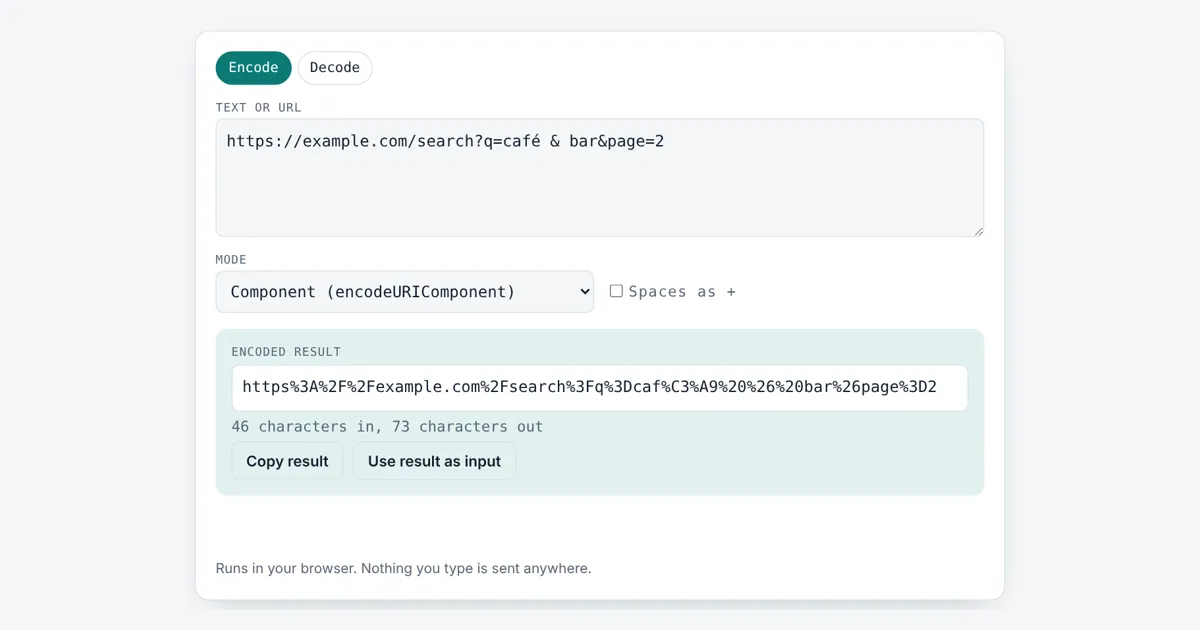
This url encoder decoder is for developers, marketers building tracking links and anyone who has to read a messy link. It uses the browser’s own encodeURIComponent and encodeURI functions, so the output matches what JavaScript produces, and it points to the exact spot when a % code is broken.
What Does URL Encoding Do?
URL encoding replaces characters that are not allowed or have a special meaning in a URL with a % sign and two hex digits for each UTF-8 byte. For example, a space becomes %20, & becomes %26 and é becomes %C3%A9, so “café & bar” encodes to caf%C3%A9%20%26%20bar.
How Does a URL Encoder Decoder Work?
A URL encoder decoder uses percent encoding, the method defined in RFC 3986 for writing any byte in a URL as a % followed by two hexadecimal digits, and reverses it to decode.
A URL may only contain a limited set of ASCII characters. Letters, digits and - _ . ~ are unreserved characters and never need encoding. Characters such as / ? # & = are reserved characters: they split a URL into its parts, so they must be encoded when they appear inside a value. Text outside ASCII is first turned into UTF-8 bytes, and each byte is encoded, which is why é becomes two codes and an emoji becomes four.
What Is the Difference Between encodeURI and encodeURIComponent?
encodeURIComponent encodes every reserved character so a value can go safely inside one query parameter, while encodeURI leaves reserved characters alone so a whole URL keeps working.
| Character | encodeURIComponent | encodeURI |
|---|---|---|
| space | %20 | %20 |
| & | %26 | & |
| / | %2F | / |
| ? | %3F | ? |
| # | %23 | # |
| = | %3D | = |
| + | %2B | + |
| : | %3A | : |
| @ | %40 | @ |
| é | %C3%A9 | %C3%A9 |
| € | %E2%82%AC | %E2%82%AC |
| ~ ! ‘ ( ) * | unchanged | unchanged |
Use component mode for a search term or a redirect link placed inside another URL. Use full URL mode only when you want to clean up spaces and accents in a link that is already well formed.
Should Spaces Be %20 or + in a URL?
Spaces should be %20 in the path of a URL, while + is only a space inside a query string sent as an HTML form, the format called application/x-www-form-urlencoded.
Tick Spaces as + to match form style when building query strings. When decoding with that box ticked, every + is read as a space first. Leave it off for paths, because there a + is a real plus sign.
Why Do I Get a Malformed URI Error?
A malformed URI error means a % is not followed by two hex digits, or the codes do not form valid UTF-8, so the text cannot be decoded.
A common case is a plain percent sign such as “50% off” that was never encoded; it should be 50%25 off. Another is a link cut in the middle of a multi-byte code. The tool shows the character position of the first bad %. To count how long a link is before you share it, use the character counter, and to clean up text case in slugs try the case converter.
Worked Example
A search link needs the term “café & bar” plus a page number. Paste the link below and keep Encode with Component mode. The tool returns a string that is safe to place inside another link:
https%3A%2F%2Fexample.com%2Fsearch%3Fq%3D
caf%C3%A9%20%26%20bar%26page%3D2
Switch the mode to Full URL and you get caf%C3%A9%20&%20bar&page=2 after the ?q=, which keeps the link working but shows why the & inside the term must be encoded on its own. Decoding “100%” gives an error at character 4.
How Do You Use the URL Encoder Decoder?
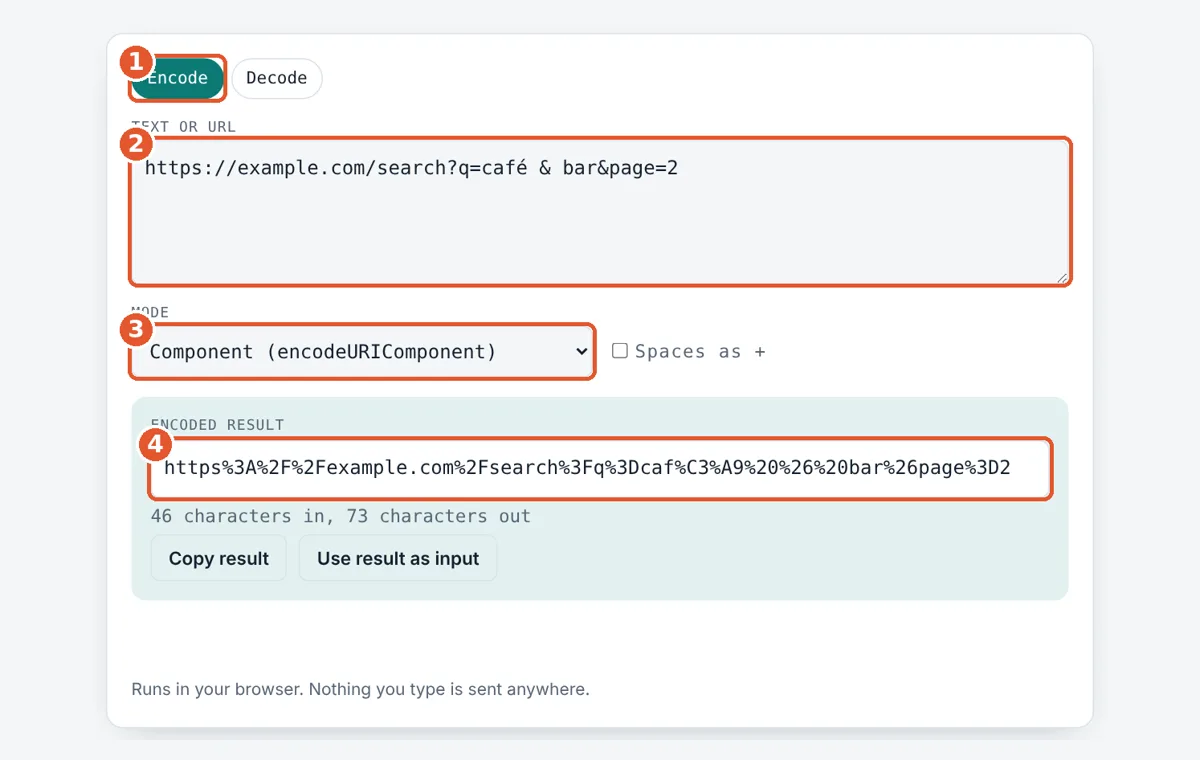
Choose encode or decode
Tap Encode to make text URL safe, or Decode to make an encoded string readable.
Paste your text or URL
Type or paste into the box. The result updates as you type.
Pick mode and spaces
Component encodes everything reserved; Full URL keeps : / ? & =. Tick Spaces as + for form style.
Copy the result
Read the result box, then copy it or send it back to the input to reverse it.
Frequently Asked Questions
What is %20 in a URL?
%20 is an encoded space. The space character has the byte value 32, which is 20 in hexadecimal, so it is written as %20. In form data a space may also appear as a + sign.
How do I encode an ampersand in a URL?
Write the ampersand as %26 when it is part of a value. Otherwise it starts a new parameter. For example, q=salt & pepper must be sent as q=salt%20%26%20pepper so the server reads one search term.
Is URL encoding the same as Base64?
No. URL encoding swaps only unsafe characters for % codes and leaves letters readable. Base64 rewrites all bytes into a 64 character alphabet, which makes text about 33% longer and unreadable.
Why does é turn into two codes?
URLs carry bytes, and é takes two bytes in UTF-8, C3 and A9. Each byte gets its own % code, so é becomes %C3%A9. The euro sign takes three bytes and most emoji take four.
Can I decode a URL that was encoded twice?
Yes. Decode once and you will see codes like %20 again, because %2520 decodes to %20. Press Use result as input and decode a second time to get plain text back.
Does encoding change letters and numbers?
No. A to Z, a to z, 0 to 9 and the marks <code>-</code> <code>_</code> <code>.</code> <code>~</code> are never encoded by either mode. encodeURIComponent also leaves ! ' ( ) * as they are.
Sources and Further Reading
- IETF RFC 3986: Uniform Resource Identifier (URI) Generic Syntax
- MDN Web Docs: encodeURIComponent()
- MDN Web Docs: encodeURI()
- WHATWG URL Standard: application/x-www-form-urlencoded
Related Tools
Last reviewed: October 2026