Add one or more JPG or PNG images, set the page order, choose A4, US Letter or pages that fit each image, and download a single PDF built on your device.
Runs in your browser. Your images are never uploaded to a server.
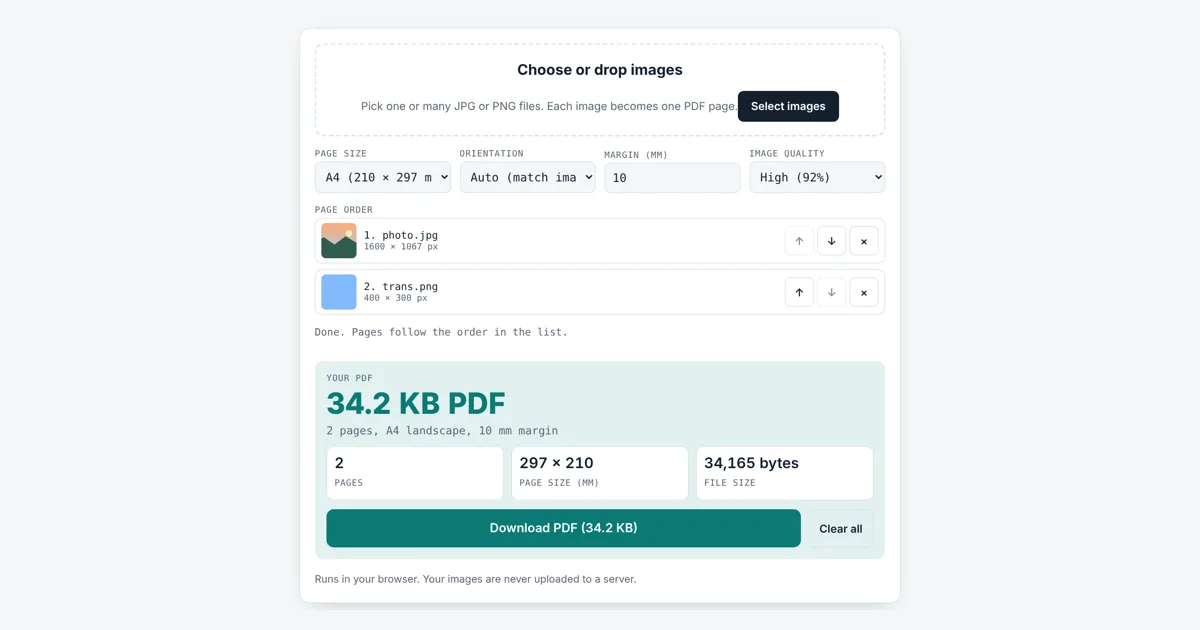
This jpg to pdf converter is for students sending scanned homework, renters sending ID pages, and anyone who must upload several photos as one document. You get a single PDF with one image per page, the page size in mm, the page count and the exact file size, with nothing uploaded.
How Do I Convert JPG to PDF?
Add your JPG or PNG files, put them in order, pick A4, Letter or Fit to image, then tap Download PDF. Each image becomes one page, scaled to fit inside the margin. Our 1600 × 1067 test photo plus a 400 × 300 PNG made a 2 page, 34.2 KB A4 PDF.
How Does JPG to PDF Conversion Work?
The tool places each image on its own PDF page as a compressed JPEG picture, then writes the page list, the image data and an index into one PDF file.
A PDF (Portable Document Format) is an open standard, ISO 32000, made of numbered objects: a catalog, a list of pages, and for each page its size, a short drawing instruction and the picture. JPEG data can sit inside a PDF almost as is, because PDF has a built in JPEG decoder called the DCTDecode filter, named after the discrete cosine transform that JPEG uses. PNG files are first drawn on a canvas and saved as JPEG, so see-through areas turn white.
space for the image = page − 2 × margin
scale = smaller of (space width ÷ image width, space height ÷ image height)
the image is centered, so its shape never changes
Should I Use A4 or Letter Size for a PDF?
Use A4 if you are in the UK, Europe, Asia, Africa or Australia, and US Letter if the PDF is for the United States, Canada or Mexico, since those are the paper sizes printers there load.
A4 comes from the ISO 216 standard, where each size is half the one above and every sheet has a 1 to √2 shape. US Letter is 8.5 × 11 inches. If the PDF will only be viewed on a screen, Fit to image makes each page exactly the size of its picture with no white border. Here is where our test photo lands with a 10 mm margin:
| Page | Page size | In points | 1600 × 1067 photo printed at |
|---|---|---|---|
| A4 landscape | 297 × 210 mm | 841.89 × 595.28 | 277 × 184.7 mm |
| A4 portrait | 210 × 297 mm | 595.28 × 841.89 | 190 × 126.7 mm |
| Letter portrait | 215.9 × 279.4 mm | 612 × 792 | 195.9 × 130.6 mm |
| Letter landscape | 279.4 × 215.9 mm | 792 × 612 | 259.4 × 173 mm |
| Fit to image, 0 mm | 423.3 × 282.3 mm | 1200 × 800.25 | Fills the page |
Auto orientation turns the page sideways for wide images and keeps it upright for tall ones, so each picture gets the most room.
Why Is My PDF a Different Size Than My Images?
The PDF size is usually close to the total of the images, because each one is saved again as a JPEG at the quality you pick and stored without further shrinking.
High (92%) keeps detail for printing. Small file (65%) roughly halved our one page test, from 32.2 KB to 17.5 KB. For a strict upload limit, shrink big photos first with the image compressor, or cut away borders and desk edges with the crop image tool so the page shows only the document.
Can I Change the Page Order Before Making the PDF?
Yes, every image appears in a numbered list, and the up and down arrows move it, while the cross removes it, and the PDF is rebuilt each time.
Pages always follow the list from top to bottom. You can add more images later and they join the end of the list, up to 50 images.
Worked Example
We added a 1600 × 1067 landscape photo and a 400 × 300 PNG logo with a transparent background. On the default A4 with Auto orientation and a 10 mm margin, the tool made a 2 page, 34.2 KB PDF (34,165 bytes). Both images are wide, so both pages are A4 landscape, 297 × 210 mm. The photo is scaled to 277 × 184.7 mm, which is about 147 pixels per inch. Moving the logo to the top, then choosing Letter and Portrait gave pages of 215.9 × 279.4 mm with the photo 195.9 mm wide. We opened each PDF in a separate PDF reader to check the pages, sizes and order.
How Do You Use the JPG to PDF Converter?
Add your images
Tap the drop area and pick one or more JPG or PNG files, or drag them in.
Pick page settings
Choose A4, Letter or Fit to image, the orientation, margin and quality.
Set the page order
Use the arrows to move images up or down, or the cross to remove one.
Download the PDF
Check the page count, page size and file size, then tap Download PDF.

Frequently Asked Questions
How many images can I put in one PDF?
Up to 50 images, one per page. Each image is saved as a JPEG inside the PDF, so 50 phone photos can make a large file. Pick Small file quality or compress the photos first if you need a smaller PDF.
Does converting JPG to PDF lower the quality?
Slightly. Each image is saved again as a JPEG at the quality you choose, 92% by default, which is hard to tell apart from the original. Choose 80% or 65% only when the file must be smaller.
What size is an A4 page in pixels?
A4 has no fixed pixel size; it is 210 × 297 mm. At 300 dots per inch that is 2480 × 3508 pixels, and at 150 dots per inch it is 1240 × 1754 pixels. Larger images simply print sharper on the page.
Can I convert PNG to PDF too?
Yes. PNG files are drawn on a canvas and turned into JPEG before they go into the PDF. Any transparent parts become white, which matches how the page looks when printed on paper.
Will the PDF open on a phone and in Adobe Reader?
Yes. The tool writes a standard PDF 1.4 file with JPEG images, which any PDF reader can open, including phone viewers, web browsers and desktop readers. We checked the output with two separate PDF checking programs.
Are my images uploaded to make the PDF?
No. The PDF is assembled byte by byte by code running in your browser. Your images stay on your device, which matters for ID cards, bank letters and other private papers.
Sources and Further Reading
- Adobe: Document management, Portable document format, PDF 32000-1:2008 (PDF)
- ISO: ISO 216 Writing paper and certain classes of printed matter, trimmed sizes
- W3C: ITU-T T.81 JPEG standard (PDF)
Related Tools
Last reviewed: October 2026