Make a QR code for a link, text, Wi-Fi login, email or phone number, choose how much damage it can survive, and download it as PNG or SVG.
Runs in your browser. The code is made on your device and nothing is sent anywhere.

This qr code generator makes a scannable code for a web link, plain text, Wi-Fi login, email or phone number, with a choice of four error correction levels. It is for shops, cafes, teachers, event hosts and anyone printing a flyer. You get a sharp PNG for screens and an SVG that scales to any print size, made entirely on your device.
How Does a QR Code Generator Work?
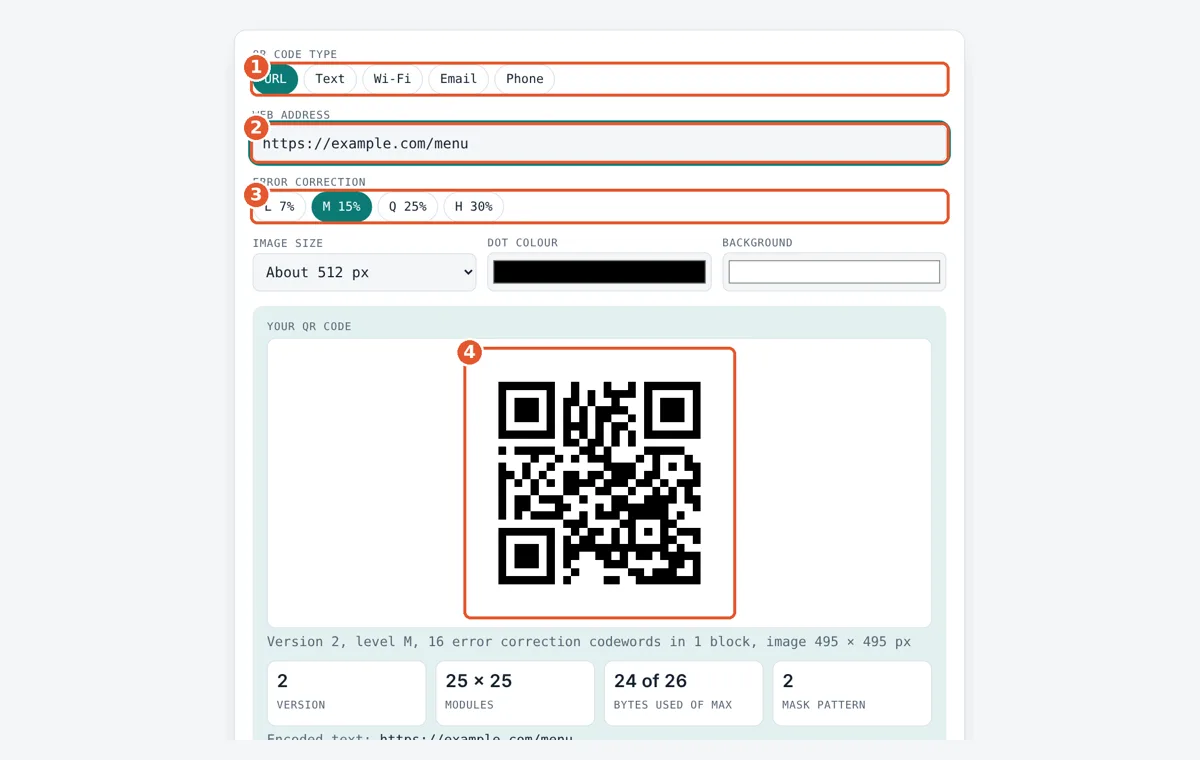
A QR code generator turns your text into bytes, adds Reed Solomon error correction, and places the bits in a square grid of black and white modules. For example, https://example.com/menu is 24 bytes, which fits in Version 2 at level M: a 25 × 25 module grid that can still be read with about 15% of it damaged.
How Does a QR Code Store Data?
A QR code stores data as a grid of dark and light squares called modules, where each module is one bit, read in a fixed zigzag path from the bottom right corner.
The QR code was invented in 1994 by Denso Wave, a Toyota group company, to track car parts, and it is defined by the international standard ISO/IEC 18004. This tool uses byte mode, which stores any text as UTF-8, so accents and emoji work. The steps are:
size in modules = 4 × version + 17
error correction codewords = Reed Solomon remainder over GF(256)
Three large squares in the corners, called finder patterns, tell the camera where the code is and which way up it is. Smaller alignment squares fix bending on bigger versions. Finally the tool tries all 8 mask patterns, which flip modules in a fixed pattern, scores each one for long runs, blocks and fake finder shapes, and keeps the lowest score so the code reads easily.
Which QR Code Error Correction Level Should I Use?
Use level M (15%) for most codes, and level H (30%) when the code will be printed small, placed outdoors, or covered with a logo.
Reed Solomon error correction adds extra codewords so a scanner can rebuild missing parts. More protection means a bigger grid for the same text. The limits below are for byte mode, from the ISO/IEC 18004 capacity table:
| Level | Recovers about | Version 1 (21 × 21) | Version 10 (57 × 57) | Version 40 (177 × 177) |
|---|---|---|---|---|
| L | 7% | 17 bytes | 271 bytes | 2,953 bytes |
| M | 15% | 14 bytes | 213 bytes | 2,331 bytes |
| Q | 25% | 11 bytes | 151 bytes | 1,663 bytes |
| H | 30% | 7 bytes | 119 bytes | 1,273 bytes |
The tool always picks the smallest version, from 1 to 40, that fits your text at the level you choose. Shorter links give smaller, easier codes, so remove tracking tags you do not need. If a link has spaces or special characters, clean it first with the URL encoder and decoder.
How Do Wi-Fi QR Codes Work?
A Wi-Fi QR code holds a short text in the form WIFI:T:WPA;S:network;P:password;; which phone cameras on iOS 11 and later and on Android 10 and later can read to join the network.
T is the security type (WPA, WEP or nopass), S is the network name and P is the password. Special characters such as ; , : and ” are escaped with a backslash. WPA passwords must be 8 to 63 characters, and the password generator can make a strong one before you print the code.
What Size Should a Printed QR Code Be?
A common rule is that a QR code should be at least one tenth of the scanning distance wide, so a code read from 50 cm should be about 5 cm across. Keep a quiet zone of 4 empty modules around the code, which this tool adds for you, and use dark dots on a light background with strong contrast.
Worked Example
A cafe wants guests to open its menu and join the guest Wi-Fi. For the menu, the owner enters https://example.com/menu at level M. That is 24 bytes, so the tool picks Version 2, a 25 × 25 grid that holds up to 26 bytes at level M, with 16 error correction codewords in 1 block. For the Wi-Fi sign, the owner picks Wi-Fi, types the network Cafe Guest and password latte2024, and the tool encodes WIFI:T:WPA;S:Cafe Guest;P:latte2024;;, which is 37 bytes. At level M that needs Version 3 (29 × 29). Because the sign hangs by the door, the owner switches to level H, and the code grows to Version 5 (37 × 37) with 88 error correction codewords in 4 blocks. Both codes were checked by decoding the downloaded PNG with an independent QR reader.
How Do You Use the QR Code Generator?
Pick the code type
Choose URL, Text, Wi-Fi, Email or Phone. The form changes to match.
Fill in the details
Type the link, text, network name and password, email or phone number.
Choose error correction
Pick L, M, Q or H. Use H for small prints, outdoor signs or codes with a logo.
Check and download
Scan the preview with your phone, then download a PNG for screens or SVG for print.
Frequently Asked Questions
Do QR codes made with this tool expire?
No. The code holds your text directly, with no redirect service, so it works for as long as the link, network or phone number inside it is still valid. If the web page moves, you need to make a new code.
How much text can a QR code hold?
In byte mode, the largest Version 40 code holds 2,953 bytes at level L and 1,273 bytes at level H. Plain English letters take 1 byte each, while accented letters take 2 bytes and most emoji take 4 bytes in UTF-8.
Should I download PNG or SVG?
Use PNG for websites, slides and messages, since every app opens it. Use SVG for print, because it is a vector file that stays sharp at any size, from a business card to a 2 metre banner.
Can I change the colours of my QR code?
Yes, but keep dark dots on a light background with strong contrast. Most scanners fail on inverted codes or pale colours. Navy on white or black on cream works well, while yellow on white often fails.
Why does my QR code look different from another generator?
The same text can give different patterns. Tools may pick a different error correction level, version or mask pattern, and all 8 masks are valid. Any standard reader decodes them to the same text.
Is it safe to put my Wi-Fi password in a QR code?
Anyone who scans the code can read the password, so only display it where you would share the password anyway, such as a guest network. Use a separate guest network rather than your main home or office network.
Sources and Further Reading
- ISO/IEC 18004:2015 QR Code bar code symbology specification
- Denso Wave: History of QR Code
- Denso Wave: QR Code information capacity
- Denso Wave: QR Code error correction feature
Related Tools
Last reviewed: October 2026