Load an SVG, choose 1x, 2x, 4x or an exact width, keep it transparent or fill a background color, and download a crisp PNG made in your browser.
Runs in your browser. Your SVG is never uploaded to a server.

This tool turns SVG to PNG for designers, developers and anyone who needs a logo or icon in a format every app accepts. You get a PNG at the exact pixel size you choose, with a transparent or solid background, drawn from the vectors so edges stay sharp.
How Do I Turn an SVG Into a PNG?
Load the SVG, pick a scale or width, choose a transparent or colored background, and download. The tool draws the vectors on a canvas at that size and saves a PNG. A 240 × 120 SVG logo at 2x gives a 480 × 240 PNG, and at 4x gives 960 × 480.
How Do You Convert SVG to PNG?
To convert SVG to PNG, the browser draws the vector shapes onto a pixel grid (a canvas) at the size you choose, then saves that grid as a PNG file.
PNG height = SVG height × scale
with Set width: height = width × (SVG height ÷ SVG width)
SVG (Scalable Vector Graphics) is a W3C format that stores shapes as maths, such as “a circle of radius 30 at 60, 60”. PNG (Portable Network Graphics) stores a fixed grid of pixels with lossless compression. Turning shapes into pixels is called rasterization. Because the tool rasterizes at the final size rather than enlarging a small picture, a 4x PNG stays sharp.
What Size Will My PNG Be?
At 1x the PNG has the same pixel size as the SVG’s width and height, and 2x or 4x multiply both sides by 2 or 4.
The tool reads the width and height on the SVG tag. If they are missing, it uses the viewBox, which sets the SVG’s own coordinate box, and if both are missing it falls back to 300 × 150, the browser default. Units such as mm, cm, in and pt are turned into CSS pixels at 96 per inch.
| Choice | 240 × 120 SVG becomes | Good for |
|---|---|---|
| 1x | 240 × 120 | Email signatures, basic web use |
| 2x | 480 × 240 | Retina and most phone screens |
| 4x | 960 × 480 | Slides, print at small sizes |
| Set width 1000 | 1000 × 500 | An exact size a site asks for |
| Set width 1200 | 1200 × 600 | Social media link previews |
Does SVG to PNG Keep a Transparent Background?
Yes, with Background set to Transparent, any area the SVG leaves empty stays fully clear in the PNG, because PNG has an alpha channel that stores how see-through each pixel is.
Choose Solid color when the image will sit on a site or app that shows transparency as black, or when you need a white box for a document. If you later need a JPG for a site that only takes photos, run the PNG through our PNG to JPG converter.
Why Does My Converted PNG Look Different?
A PNG can look different when the SVG uses web fonts, linked images or files the browser blocks for safety when an SVG is loaded as an image.
Text set in a font you do not have installed falls back to a system font. For a perfect match, convert text to outlines in your design program before exporting the SVG. To shrink a large PNG afterwards, try the image compressor.
Worked Example
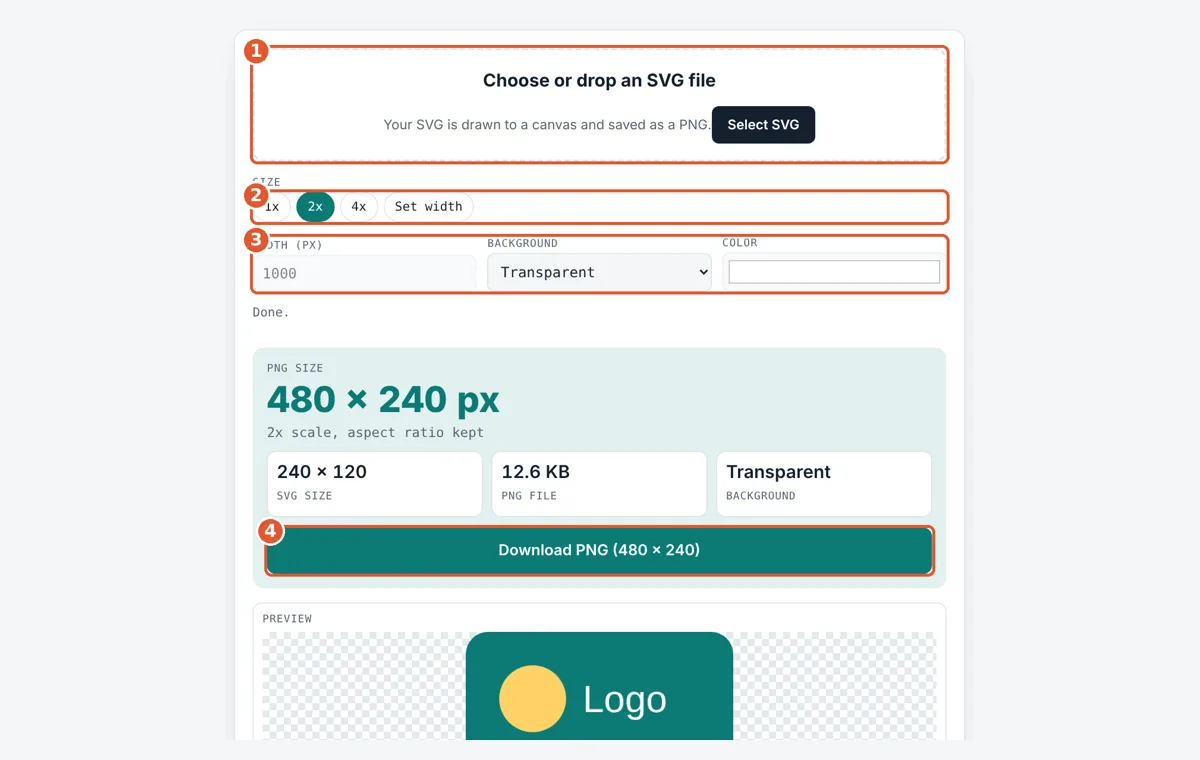
We loaded a 240 × 120 pixel logo SVG: a teal rounded box, a yellow circle and the word Logo. At the default 2x the tool made a 480 × 240 px PNG with a transparent background, so the rounded corners stay clear. Tapping 4x gave 960 × 480 px. Choosing Set width and typing 1000 gave 1000 × 500 px, keeping the 2 to 1 shape. Switching Background to Solid color with white filled the corners white. File sizes depend on the fonts in your browser, so the PNG KB shown can differ between devices.
How Do You Use the SVG to PNG Converter?
Choose your SVG
Tap the drop area and pick an .svg file, or drag one in.
Pick the size
Tap 1x, 2x or 4x, or tap Set width and type the width in pixels.
Choose a background
Keep Transparent or pick Solid color and choose the color.
Download the PNG
Check the pixel size and file size, then tap Download PNG.
Frequently Asked Questions
Is SVG to PNG conversion lossless?
The PNG itself is lossless, so no detail is lost when it is saved. But a PNG is fixed at one pixel size, so it will blur if you enlarge it later. Convert at the largest size you will need, such as 4x.
What is the biggest PNG I can make?
This tool allows widths up to 8,000 pixels and up to 40 million pixels in total, which is enough for an 8000 × 5000 image. Larger canvases can crash phones, so the tool stops before that.
Why is the PNG file bigger than the SVG?
An SVG stores a few lines of shape code, often under 1 KB, while a PNG stores every pixel. A 960 × 480 PNG has 460,800 pixels, so it is usually many KB even with compression.
Can I convert SVG to PNG on a phone?
Yes. The tool works in mobile browsers on Android and iPhone. Tap the drop area to pick the SVG from your files, then tap Download PNG to save it.
Does the tool upload my SVG?
No. The file is read and drawn by your own browser using the canvas. Nothing is sent to a server, so private logos and client artwork stay on your device.
What if my SVG has no width or height?
The tool uses the viewBox size instead. For example, viewBox 0 0 24 24 is treated as 24 × 24, so 4x gives a 96 × 96 PNG. With no viewBox either, it uses 300 × 150.
Sources and Further Reading
- W3C: Scalable Vector Graphics (SVG) 2
- W3C: Portable Network Graphics (PNG) Specification
- MDN Web Docs: CanvasRenderingContext2D drawImage() method
Related Tools
Last reviewed: October 2026