Add a word you like, pick a style and a length limit, and get 20 fresh username ideas at once, each with its own copy button.
Runs in your browser. Check that a name is free on each platform before you sign up.
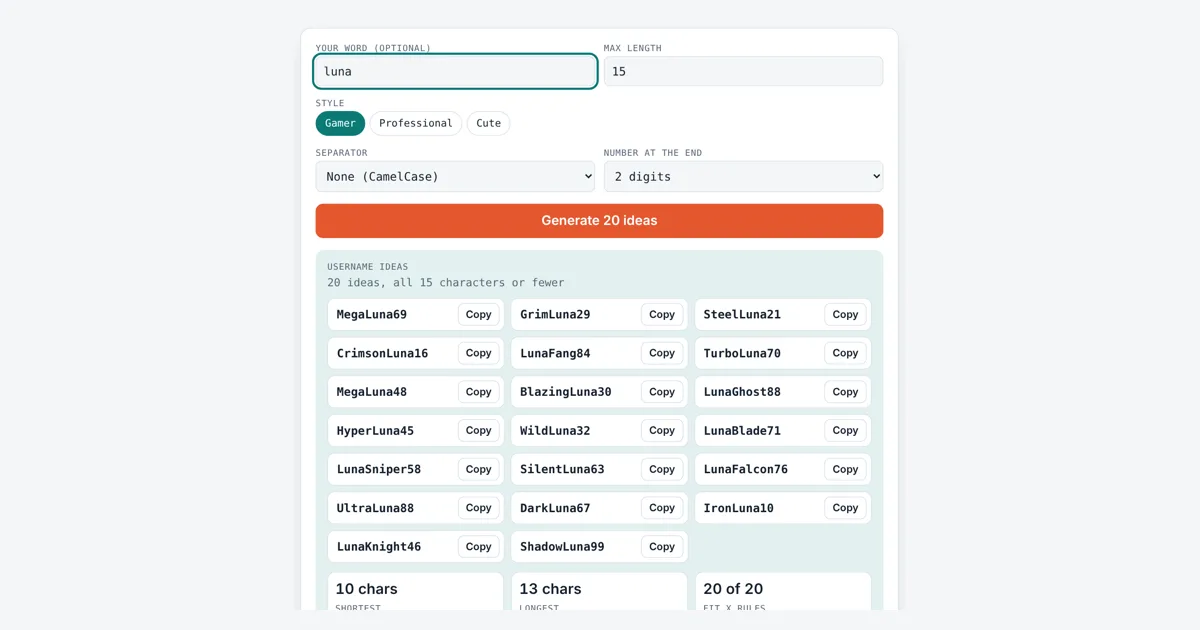
This username generator builds names from an adjective plus a noun, or mixes in a word of your own, then adds an optional number. It is for gamers, creators, small businesses and anyone setting up a new account who wants ideas that already fit the length rules. You get 20 ideas per click, three styles and a quick check against the strictest common limit.
How Do You Come Up With a Good Username?
A good username is short, easy to say and spell, and fits the platform’s rules. A simple method is adjective plus noun plus a number, like SilentRaven47, which is 13 characters. Keep it under 15 characters so it also works on X, avoid personal details like your birth year, and check it is free.
How Does the Username Generator Build Names?
The username generator joins a random adjective and a random noun from the style you pick, or puts your own word in place of one of them, and can add 2 or 3 random digits at the end. Each style has its own word set: Gamer uses words like rogue and viper, Professional uses words like prime and studio, and Cute uses words like peachy and mochi. The tool throws away any idea that is longer than your max length or that repeats an earlier one.
or adjective + your word, or your word + noun
You can join the words in CamelCase, where each word starts with a capital letter like FrostByte, or with an underscore or period. CamelCase makes long names easier to read without using any symbols.
What Are the Username Rules on Popular Platforms?
Most platforms allow only letters, numbers and one or two symbols, and each sets its own length limit. The table sums up the published rules at the time of writing. Rules change, so read the help page of the site you are joining.
| Platform | Length | Allowed characters |
|---|---|---|
| X (formerly Twitter) | Up to 15 | Letters, numbers, underscore |
| Discord | 2 to 32 | Lowercase letters, numbers, underscore, period |
| YouTube handle | 3 to 30 | Letters, numbers, underscore, hyphen, period |
| TikTok | See app | Letters, numbers, underscore, period (not at the end) |
The Fit X rules box counts how many ideas have 15 characters or fewer and use only letters, numbers and underscores, so they would pass the strictest limit above. On Discord usernames are not case sensitive and are stored in lowercase, so pick the all lowercase option there. A YouTube handle cannot start or end with a period or hyphen.
How Do I Check if a Username Is Available?
You check availability by trying the name in the sign up or edit profile screen of each platform, because only the platform knows which names are taken. This tool cannot see other sites, so treat every idea as a suggestion. A handle, the name after the @ sign, must be unique on each site, while a display name usually does not. If your first choice is gone, the 2 or 3 digit ending helps. For a fancy display name instead of a handle, try the bold text generator.
What Makes a Username Safe?
A safe username does not reveal your full name, age, school, address or birth year. Mixing random words, as this tool does, keeps personal details out. Use a different strong password for each account, which the password generator can create, and never use your username as part of your password. To see how long a name with special letters really is, paste it into the character counter.
Worked Example
Jade plays under the nickname Luna and wants a gamer tag for X, which allows 15 characters. She types luna, keeps the Gamer style, CamelCase and a 2 digit number. One run gave ideas such as NeonLuna75 (10 characters), LunaPhoenix57 (13) and BlazingLuna15 (13). The boxes showed a shortest idea of 10 characters, a longest of 13 and 20 of 20 ideas that fit X rules. With no word and the Cute style, the same settings gave ideas like SleepyMochi62 and HoneyDaisy17. Each click makes a new random set, so your list will differ.
How Do You Use the Username Generator?
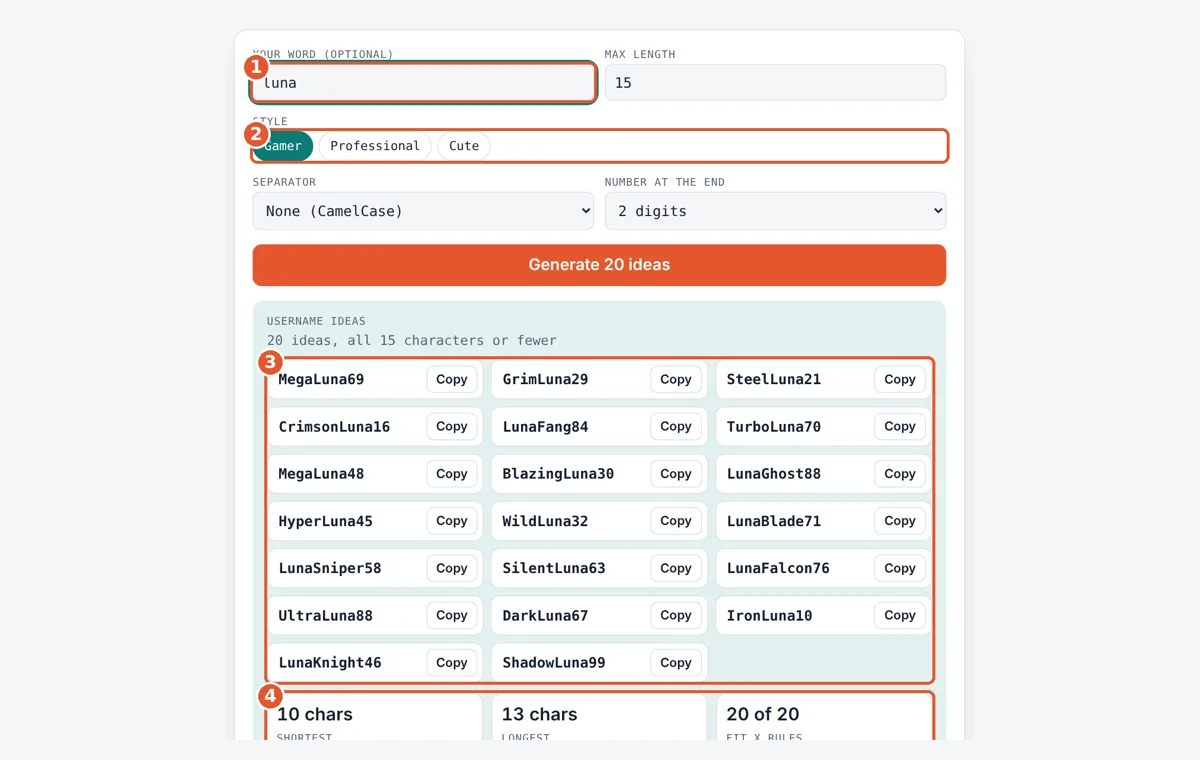
Add your word
Type an optional name, hobby or brand word. Leave it blank for pure random ideas.
Set the limit
Enter the max length. Use 15 for X, 30 for YouTube or 32 for Discord.
Pick a style
Choose Gamer, Professional or Cute, plus a separator and number option.
Copy an idea
Tap Copy next to a name you like, then check it is free on each platform.
Frequently Asked Questions
How long should a username be?
Aim for 6 to 15 characters. Shorter names are easier to remember and type, and 15 characters is the limit on X, the strictest of the large platforms. Discord allows up to 32 and YouTube handles up to 30, so you have more room there.
Can I use spaces or emoji in a username?
Almost never. Handles on X, Discord, TikTok and YouTube do not allow spaces or emoji. Use CamelCase like FrostByte, or an underscore like frost_byte, instead. Spaces and emoji are usually fine in a display name, which is separate from the handle.
Why add numbers to the end of a username?
Numbers make a name more likely to be free when the plain words are taken. A 2 digit ending gives 90 options for each word pair and a 3 digit ending gives 900. Avoid using your birth year, as it reveals your age.
Does this tool check if a username is taken?
No. It runs only in your browser and cannot look up accounts on other sites. Try each idea on the sign up or profile page of the platform. Signing up with the same name on several sites early helps keep your brand consistent.
What is the difference between a username and a display name?
A username or handle is unique and used in links and mentions, like @frostbyte. A display name is the name shown on your profile, and many people can share it. Display names usually allow spaces, capitals and special characters.
How many different names can the generator make?
Without your own word, Gamer has 900 adjective and noun pairs and Professional and Cute have 400 each. Adding a 2 digit number multiplies each pair by 90, so Gamer alone can make 81,000 combinations before length limits.
Sources and Further Reading
- X Help Center: Username rules
- Discord Support: New usernames and display names
- YouTube Help: Handle guidelines
- TikTok Support: Changing your username
Related Tools
Last reviewed: October 2026