Fill in your page title, description and URL to get ready to paste HTML for the head of your page, with a pixel width estimate that shows when Google may cut your text short.
Runs in your browser. Nothing you type is sent anywhere.
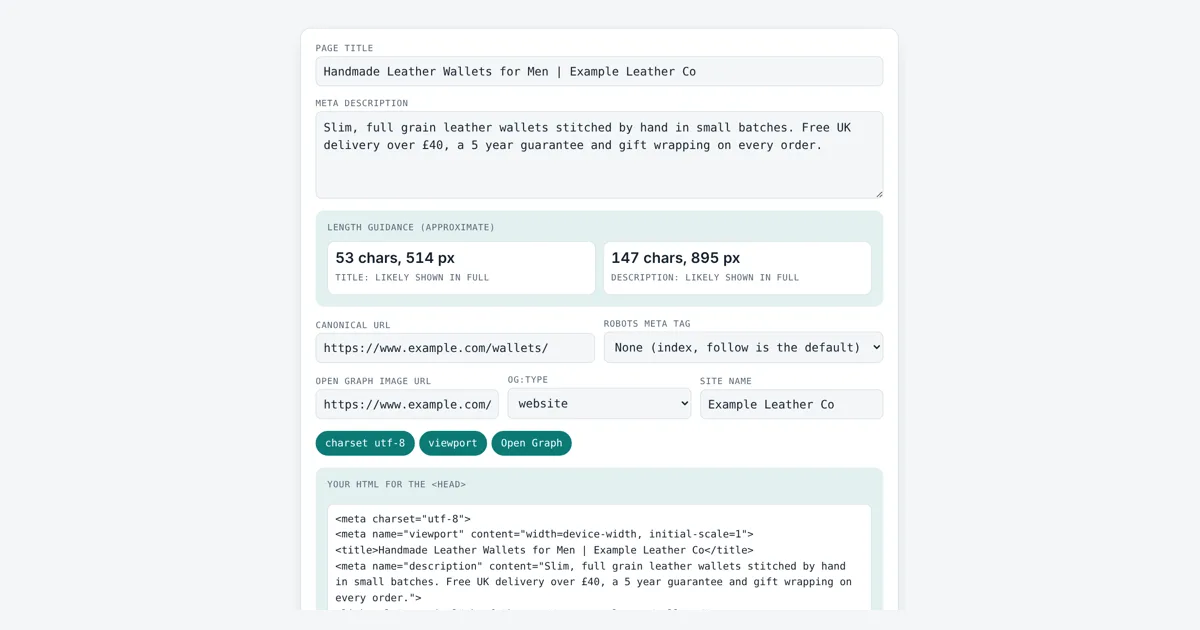
This meta tag generator is for site owners, bloggers and developers who want correct head tags without hand typing them. You get a title element, a meta description, a canonical link, an optional robots tag, the viewport tag and basic Open Graph tags, with special characters escaped so the HTML stays valid. Open Graph is the protocol from ogp.me that Facebook, LinkedIn and many chat apps read to build link previews.
What Does a Meta Tag Generator Do?
A meta tag generator turns your page details into HTML tags for the head of the page. For example, a 53 character title measuring about 514 px and a 147 character description of about 895 px both fit the common desktop widths of roughly 600 px and 920 px, so they will likely show in full.
Which Meta Tags Does a Page Need for SEO?
Most pages need only a few tags: a unique title element, a meta description, a canonical link, a charset and a viewport tag, plus Open Graph tags if the page will be shared.
The title element is the text in the browser tab and the main source Google uses for the title link in results. The meta description is a short summary that Google may use as the snippet. A canonical URL, set with <link rel="canonical">, tells search engines which address is the main copy when the same page is reachable at several URLs. The viewport tag makes the page scale to phone screens, which matters because Google uses mobile first indexing.
| Tag | What it does | Used by Google Search? |
|---|---|---|
| <title> | Names the page | Yes, main source of the title link |
| meta description | Summary of the page | Yes, may be used as the snippet |
| link rel=”canonical” | Picks the main URL | Yes, as a strong hint |
| meta robots | Indexing and snippet rules | Yes |
| meta viewport | Mobile scaling | Signals a mobile friendly page |
| og: tags | Social link previews | Not for ranking |
| meta keywords | List of keywords | No, ignored since 2009 |
How Long Should a Title Tag and Meta Description Be?
There is no fixed character limit for either one, because Google cuts titles and snippets by pixel width to fit the device, not by counting characters.
Google Search Central says titles can be any length and are truncated as needed, and that a meta description can be any length while snippets are shortened to fit the screen. A useful rule of thumb is about 600 px for a desktop title in 20 px Arial and about 920 px for a two line desktop description in 14 px Arial. Wide letters like W and M use more space than i or l, so two titles with the same character count can fit differently. This tool measures your text with the browser’s own font engine. To count characters in longer copy, try the character counter, and to check that a description reads well use the word counter.
What Does the Robots Meta Tag Do?
The robots meta tag tells search engines whether they may index a page, follow its links and show a snippet, and it applies only to the page it sits on.
If you add no robots tag, the default is index, follow, so you do not need to write it. Use noindex for thank you pages or internal search results, and max-image-preview:large if you want large image previews in Google Discover. A page blocked in robots.txt cannot have its noindex tag seen, so do not block a page you want removed.
Does Google Still Use the Meta Keywords Tag?
No, Google has not used the meta keywords tag for web ranking since at least 2009, when Google Search Central stated it publicly.
That is why this generator leaves it out. Spend the time on a clear, specific title and description instead. If a URL in your tags has spaces or accents, run it through the URL encoder decoder first.
Worked Example
A small leather shop builds the head tags for its wallets page. The title “Handmade Leather Wallets for Men | Example Leather Co” is 53 characters and about 514 px wide, under the rough 600 px desktop width. The description is 147 characters and about 895 px, under 920 px. The tool outputs:
<meta name=”viewport” content=”width=device-width, initial-scale=1″>
<title>Handmade Leather Wallets for Men | Example Leather Co</title>
<link rel=”canonical” href=”https://www.example.com/wallets/”>
<meta property=”og:image” content=”https://www.example.com/img/wallets-1200×630.jpg”>
Typing “Wallets & Belts” as the title gives Wallets & Belts in the code, because an ampersand must be escaped in HTML. A longer title, “Handmade Leather Wallets for Men and Women, Card Holders | Example Leather Company”, is 82 characters and about 816 px, so the tool warns that it may be cut on desktop.
How Do You Use the Meta Tag Generator?
Write the title
Type the page title. The box below shows its length in characters and pixels.
Write the description
Add a short, specific summary of the page and watch the pixel estimate.
Set URL, robots and image
Enter the canonical URL, pick a robots rule if needed and add the share image.
Copy the HTML
Copy the finished tags and paste them inside the head of your page.

Frequently Asked Questions
Can I use the same meta description on every page?
You can, but it is a poor idea. Google Search Central advises a unique description for each page. Duplicate descriptions give searchers no reason to pick one page over another, and Google is more likely to write its own snippet.
Why does Google show a different title than my title tag?
Google generates title links from several sources, including the title element, main headings and anchor text. It may rewrite a title that is too long, stuffed with keywords, boilerplate or does not match the page. A clear, unique title is used most often.
Where do I paste the generated meta tags?
Paste them inside the head element of your HTML, before the closing head tag. In WordPress, an SEO plugin usually writes the title, description and canonical for you, so only add tags it does not already output to avoid duplicates.
Should the canonical URL point to the page itself?
Yes, in most cases. A self referencing canonical on each page is a common and safe choice. Point it at another URL only when this page is a duplicate, such as a copy with tracking parameters or a print version.
Does the order of meta tags matter?
Order does not matter for search engines, but the charset tag should come first, within the first 1,024 bytes of the page, so the browser reads the text with the right encoding. The rest can go in any order.
What size should the Open Graph image be?
Use an image of at least 1200 by 630 pixels, which is a 1.91 to 1 ratio. That size shows sharply in large link previews on most social networks and chat apps. Use a full https URL for the image.
Sources and Further Reading
- Google Search Central: Influencing your title links
- Google Search Central: Control your snippets in search results
- Google Search Central: Meta tags and attributes that Google supports
- The Open Graph protocol
Related Tools
Last reviewed: October 2026