Paste JSON to beautify it, minify it or sort its keys, and see at once whether it is valid, with the exact line and column of any error.
Runs in your browser. Your JSON is never uploaded or stored.
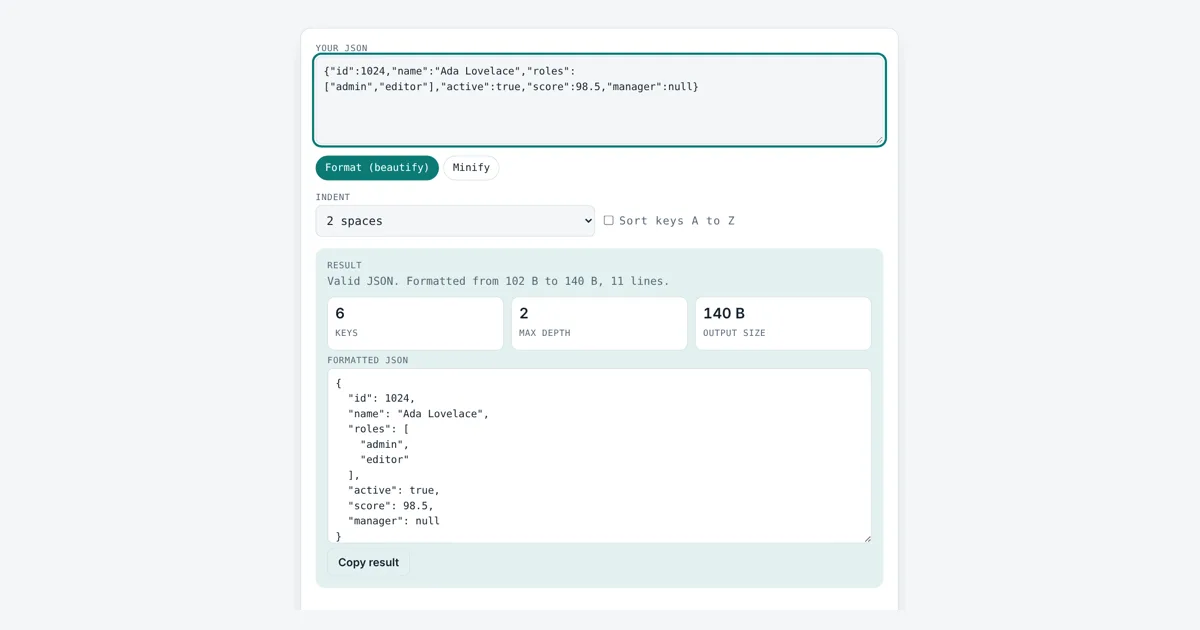
This json formatter beautifies messy or one line JSON with 2 spaces, 4 spaces or tabs, minifies it for production, and checks that it is valid. It is for developers, testers and anyone reading an API response. If the JSON is broken, you get the exact line and column of the first error and a short note on how to fix it.
How Does a JSON Formatter Work?
A JSON formatter parses your text against the JSON grammar and prints it again with one value per line and consistent indentation. For example, a 102 byte one line object with 6 keys becomes 11 readable lines and 140 bytes with 2 space indents, and minifying turns it back into 102 bytes.
What Makes JSON Valid?
JSON is valid when it follows the grammar in RFC 8259, the IETF standard for JavaScript Object Notation, which is also published as ECMA-404.
A JSON text is one value: an object in curly braces holding key and value pairs, an array in square brackets, a string, a number, or the words true, false or null. The rules trip people up most often in these places:
| Mistake | Invalid | Valid |
|---|---|---|
| Trailing comma | [1, 2,] | [1, 2] |
| Single quotes | {‘a’: 1} | {“a”: 1} |
| Unquoted key | {a: 1} | {“a”: 1} |
| Leading zero | {“n”: 01} | {“n”: 1} |
| Comment | {“a”: 1} // note | {“a”: 1} |
| NaN or Infinity | [NaN] | [null] |
| Raw line break in string | “line one line two” | “line one\nline two” |
| Bare decimal | [.5] | [0.5] |
Whitespace between values does not matter to a parser, which is why formatting and minifying never change the data. This tool keeps numbers exactly as you typed them, so 1.50 or 12345678901234567890 are not rounded, and it keeps escapes such as \u00e9 unchanged.
How Does the JSON Formatter Find the Error Line and Column?
It reads the text one character at a time with a parser that follows the RFC 8259 grammar and stops at the first character that breaks a rule.
column = characters since the last line break + 1
The tool then shows that line with a caret ^ under the problem. A missing comma is reported where the next value starts, and a trailing comma is reported at the closing bracket, because that is the first point where the text can no longer be valid.
Should I Minify or Beautify JSON?
Beautify JSON when people need to read it, and minify JSON when machines send or store it, since minification removes every space and line break outside strings. In the worked example, minifying cut the size by 27%. Servers that use gzip shrink the gap further, so the main gain is for logs, config files and storage. When JSON has to travel inside a link, encode it with the URL encoder and decoder, and to make unique ids for records, use the UUID generator.
Does Sorting Keys Change My JSON?
Sorting keys changes only the order, and RFC 8259 says objects are unordered, so a compliant reader gets the same data. Sorted keys make two versions of a file much easier to compare in a diff. Array order is never changed, because arrays are ordered. If one object holds the same key twice, the tool warns you, since different readers may keep a different value.
Worked Example
A developer copies this one line API response, which is 102 bytes:
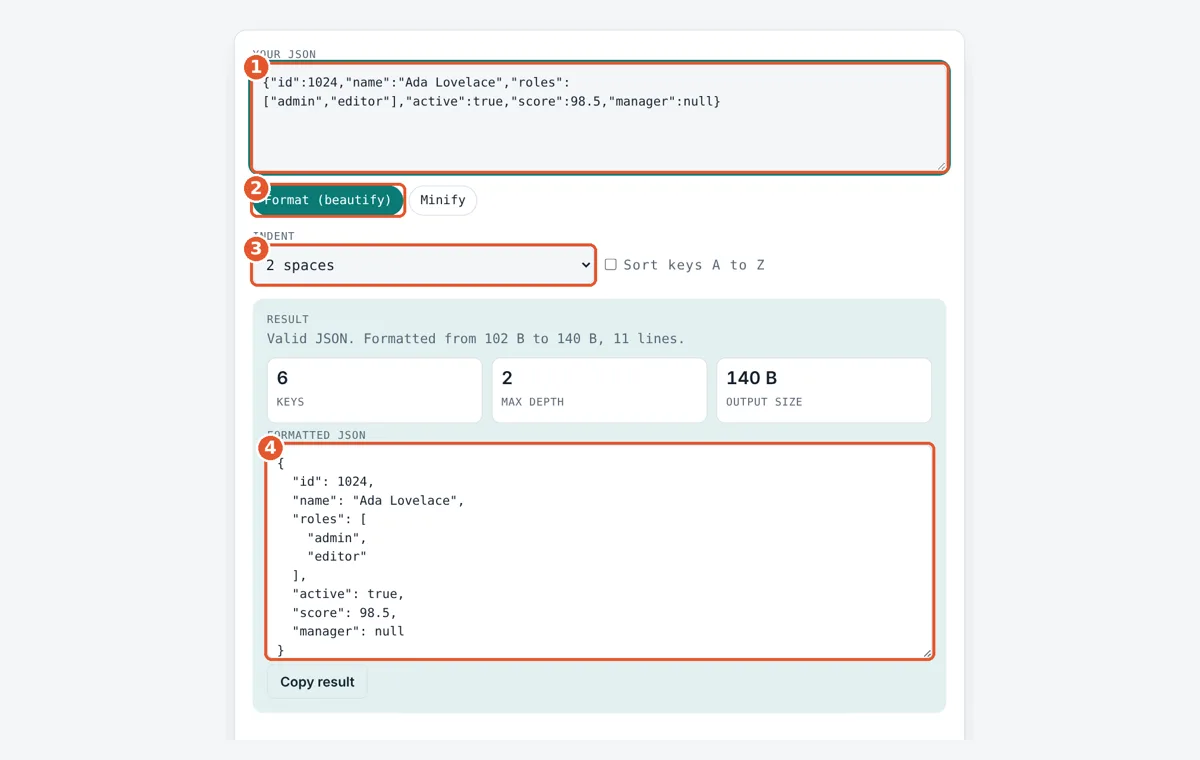
With Format and 2 spaces, the tool reports valid JSON with 6 keys and a max depth of 2 (the roles array inside the object), and prints it as 11 lines and 140 bytes. With 4 spaces it grows to 162 bytes, and with tabs it is 129 bytes. Pasting the 140 byte formatted version back in and pressing Minify returns the 102 byte original, 27% smaller. If a trailing comma sneaks in before the last brace on line 4, the tool reports Line 4, column 1: Trailing comma before “}” is not allowed.
How Do You Use the JSON Formatter?
Paste your JSON
Paste or type JSON into the Your JSON box. The tool checks it as you type.
Pick format or minify
Choose Format to beautify or Minify to strip all spaces and line breaks.
Set indent and sorting
Pick 2 spaces, 4 spaces or tab, and tick Sort keys to order keys A to Z.
Check and copy
Read the status, keys, depth and size, then press Copy result.
Frequently Asked Questions
Is my JSON sent to a server when I format it?
No. The parser and formatter run in your browser in plain JavaScript, so the JSON never leaves your device. That makes it safe for API keys, tokens or customer records, though you should still remove secrets before sharing results.
Why does the tool say my JSON is invalid when JavaScript accepts it?
JavaScript object literals allow single quotes, unquoted keys, trailing commas and comments, but JSON does not. For example, {a: 1,} works in JavaScript code yet fails JSON parsing at column 2, where the unquoted key starts.
Can JSON have comments?
No. RFC 8259 has no comment syntax, so // and /* */ make the text invalid. Some tools accept JSON with comments, called JSONC, for config files, but standard parsers reject them. Put notes in a normal key such as _note instead.
Should I use 2 spaces or 4 spaces to indent JSON?
Both are valid and the data is identical. 2 spaces is common in JavaScript projects and keeps deep nesting readable, while 4 spaces matches Python json.dumps examples. In the worked example, 2 spaces gave 140 bytes and 4 spaces gave 162 bytes.
What is the largest JSON file this formatter can handle?
It accepts up to 5 million characters, about 5 MB of plain text. Files of 1 to 2 MB usually format in under a second on a modern laptop. Very large files are better handled with a command line tool such as jq.
Does formatting change numbers like 1.50 or very large ids?
No. This tool keeps each number exactly as written, so 1.50 stays 1.50 and a 20 digit id is not rounded. Many formatters convert numbers to JavaScript doubles, which lose precision after about 15 to 17 significant digits.
Sources and Further Reading
- IETF RFC 8259: The JavaScript Object Notation (JSON) Data Interchange Format
- Ecma International: ECMA-404 The JSON Data Interchange Syntax
- MDN Web Docs: JSON.stringify()
Related Tools
Last reviewed: October 2026