Type a binary number to get its decimal value, or switch to decimal, hex or octal input to convert the other way. Every result shows all four bases, the bit length and the place value working.
Runs in your browser. Nothing you type is sent anywhere.
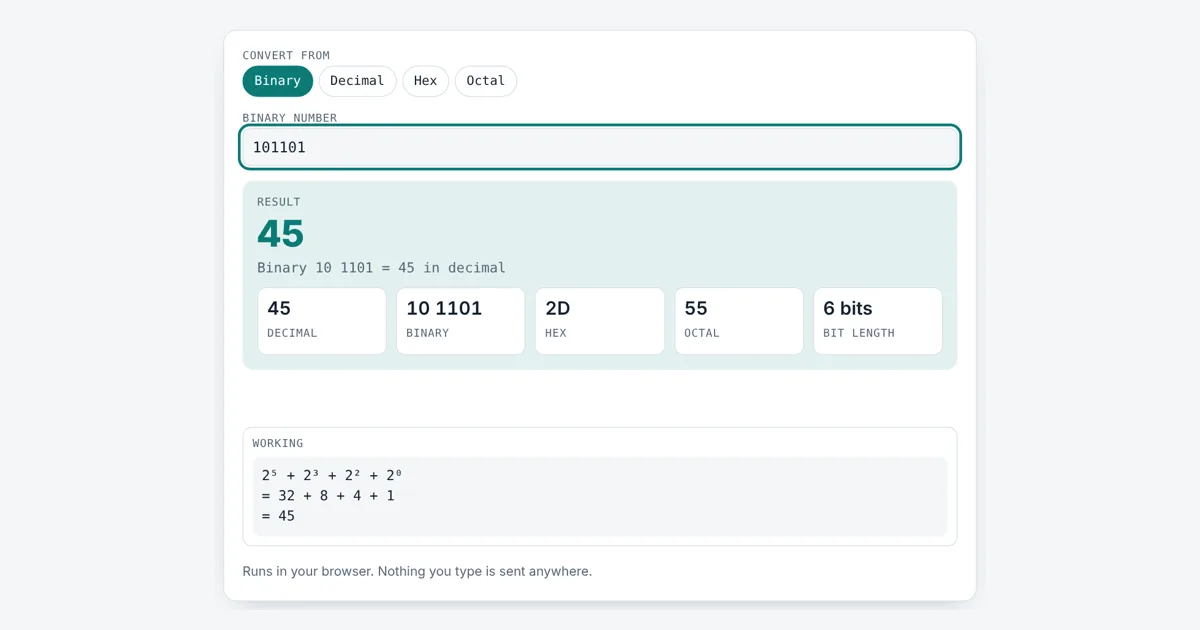
This binary to decimal converter is for computer science students, programmers and electronics hobbyists. It converts between binary, decimal, hexadecimal and octal in any direction, uses exact big integer maths (JavaScript BigInt, which stores whole numbers of any size) so a 64 bit or 1,000 digit value never loses precision, and writes out the powers of 2 so you can learn the method, not just copy the answer.
How Do You Convert Binary to Decimal?
To convert binary to decimal, multiply each bit by its power of 2 and add the results, starting with 2⁰ on the right. For 101101, the 1 bits sit at 2⁵, 2³, 2² and 2⁰, so the value is 32 + 8 + 4 + 1 = 45. Zeros add nothing.
What Is the Binary Number System?
The binary number system is base 2: it uses only the digits 0 and 1, and each place is worth twice the place to its right. Our everyday decimal system is base 10, where each place is worth ten times more. A single binary digit is a bit, and 8 bits make a byte, which can hold 2⁸ = 256 values, from 0 to 255. Computers use binary because a circuit can easily be in one of two states, off or on.
This is positional notation: the same digit means a different amount depending on where it sits. In binary the place values from the right are 1, 2, 4, 8, 16, 32, 64, 128 and so on.
How Do You Convert Decimal to Binary?
To convert decimal to binary, divide the number by 2 again and again, write down each remainder, then read the remainders from bottom to top. For 156: 156 ÷ 2 = 78 r 0, 78 ÷ 2 = 39 r 0, 39 ÷ 2 = 19 r 1, 19 ÷ 2 = 9 r 1, 9 ÷ 2 = 4 r 1, 4 ÷ 2 = 2 r 0, 2 ÷ 2 = 1 r 0, 1 ÷ 2 = 0 r 1. Reading up gives 10011100. Pick Decimal in the tool and it lists these steps for any number up to 64 bits. The same remainder idea is the basis of the GCF calculator, which uses repeated division too.
How Are Hex and Octal Related to Binary?
Hexadecimal (base 16) packs every 4 bits into one digit from 0 to F, and octal (base 8) packs every 3 bits into one digit from 0 to 7. That is why programmers use hex as shorthand: the byte 1111 1111 is just FF, and 1001 1100 is 9C. Hex colour codes and memory addresses are written this way, while Unix file permissions such as 755 use octal. The tool groups binary in blocks of 4 so you can read the hex digits straight off. The same timestamps you see in Unix time are stored as binary integers inside the computer.
| Decimal | Binary | Hex | Octal |
|---|---|---|---|
| 0 | 0 | 0 | 0 |
| 1 | 1 | 1 | 1 |
| 2 | 10 | 2 | 2 |
| 5 | 101 | 5 | 5 |
| 8 | 1000 | 8 | 10 |
| 10 | 1010 | A | 12 |
| 15 | 1111 | F | 17 |
| 16 | 1 0000 | 10 | 20 |
| 42 | 10 1010 | 2A | 52 |
| 100 | 110 0100 | 64 | 144 |
| 255 | 1111 1111 | FF | 377 |
| 256 | 1 0000 0000 | 100 | 400 |
| 1,024 | 100 0000 0000 | 400 | 2000 |
| 65,535 | 1111 1111 1111 1111 | FFFF | 177777 |
Worked Example
A student is given the binary number 101101 in class. Enter it with Binary selected: the working shows 2⁵ + 2³ + 2² + 2⁰ = 32 + 8 + 4 + 1, so the answer is 45, which is 2D in hex and 55 in octal, using 6 bits. Now pick Decimal and type 156: the tool divides by 2 eight times and returns 1001 1100, hex 9C. For a long value, paste 1 followed by 64 zeros in binary and you get exactly 18,446,744,073,709,551,616, which is 2⁶⁴. If you need powers of 2 like that in general, the scientific notation converter helps write them compactly.
How Do You Use the Binary to Decimal Converter?
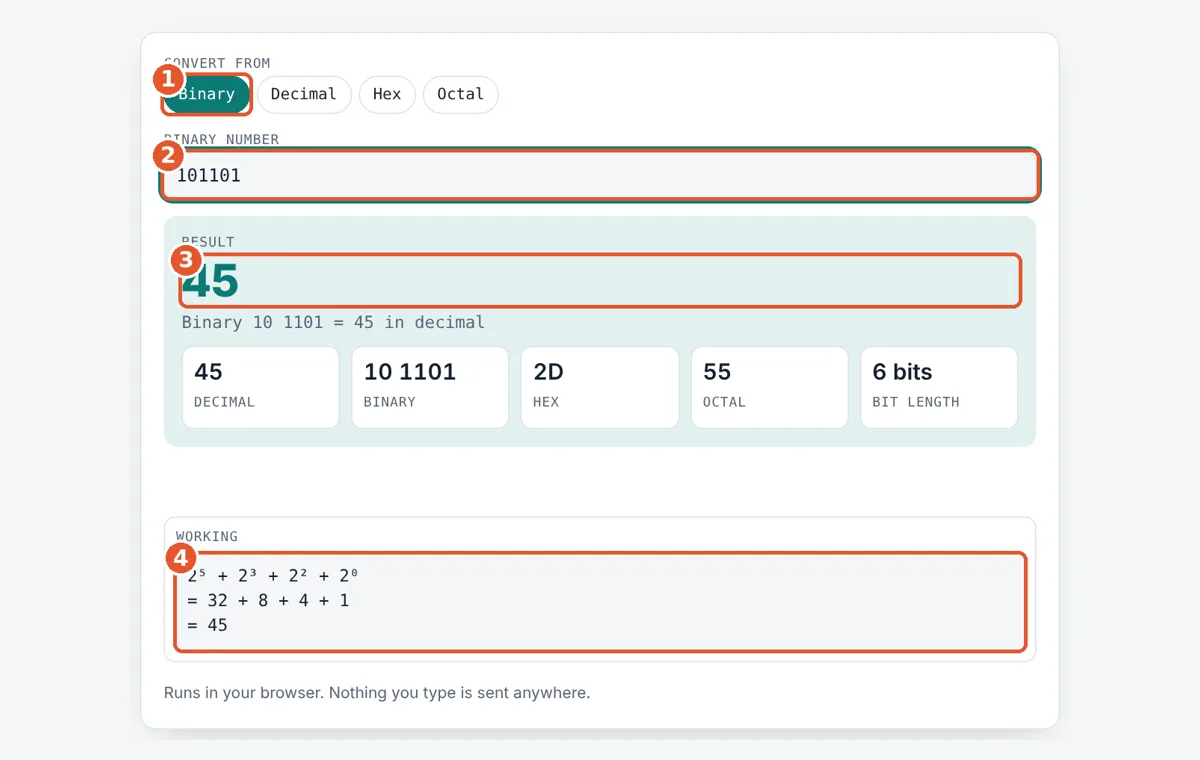
Choose the input base
Tap Binary, Decimal, Hex or Octal to set the kind of number you will type.
Type the number
Enter the digits. Spaces and a 0b or 0x prefix are ignored.
Read the result
Binary input shows the decimal value; other inputs show the binary value.
Check every base
The boxes show decimal, binary, hex, octal and bit length, with the working below.
Frequently Asked Questions
What is 11111111 in decimal?
11111111 in binary is 255 in decimal. It is eight 1 bits, so the value is 128 + 64 + 32 + 16 + 8 + 4 + 2 + 1 = 255, the largest number one byte can hold. In hex it is FF.
What is 10 in binary?
The decimal number 10 is 1010 in binary. Divide by 2: 10 gives 5 r 0, 5 gives 2 r 1, 2 gives 1 r 0, 1 gives 0 r 1. Reading the remainders upward gives 1010, which is A in hex.
How many bits do I need for a number?
A number n above 0 needs the bits in its binary form, which is the whole part of log₂ n plus 1. So 255 needs 8 bits and 256 needs 9. The tool shows this as the bit length.
How long a binary number can I convert?
Up to 1,100 digits in any base. The tool uses JavaScript BigInt, so the answer is exact with no rounding. Normal numbers lose precision above 2⁵³, about 9 × 10¹⁵, but BigInt does not.
Why do programmers write 0x and 0b before numbers?
The prefix tells the reader and the compiler which base is used: 0b for binary, 0x for hex and often 0o for octal. So 0x10 is 16, not ten. You can paste numbers with these prefixes into the tool.
Does this converter handle negative or fractional binary?
No. It converts whole numbers from 0 upward. Negative values in computers usually use two's complement, which depends on a fixed bit width such as 8 or 32, so convert the positive value first and apply the sign rule your system uses.
Sources and Further Reading
Related Tools
Last reviewed: October 2026