Add a row for each value with its weight, as a percentage or as points, and get the weighted average at once with the total weight and the plain mean for comparison.
| Value | Weight (%) | Remove |
|---|
Runs in your browser. Nothing you type is sent anywhere.
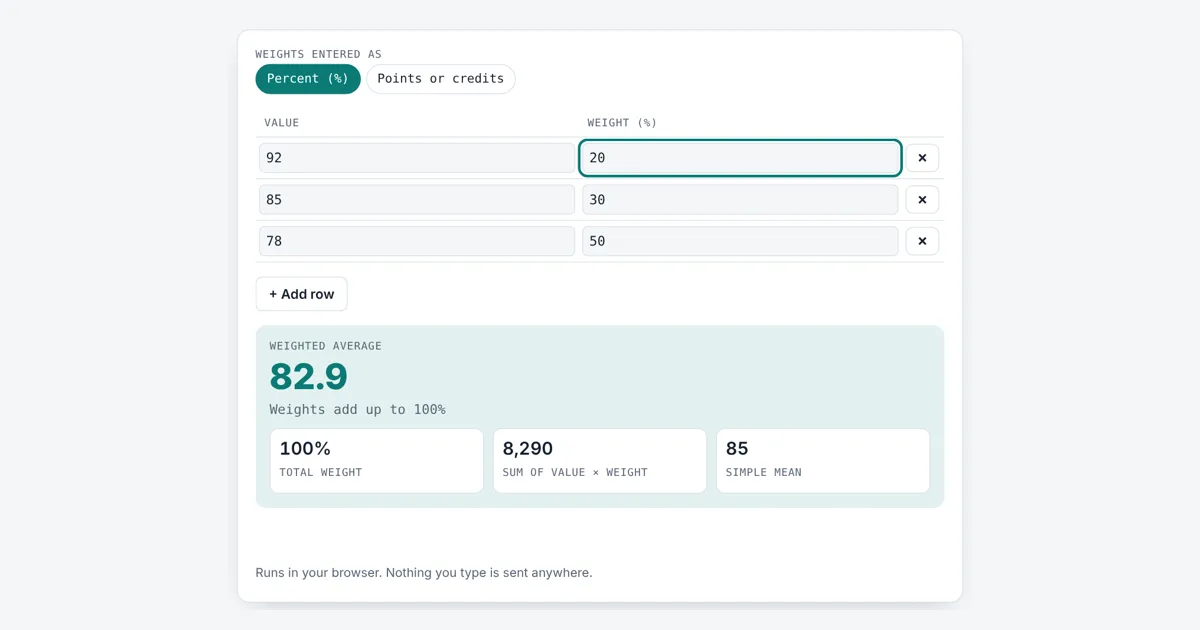
This weighted average calculator is for students working out a course grade from weighted categories, and for anyone averaging prices, scores or ratings where some items count more than others. Add as many rows as you need, choose percent or points, and you get the weighted mean with the working shown.
How Do You Calculate a Weighted Average?
Multiply each value by its weight, add the products, then divide by the sum of the weights. For grades of 92 (20%), 85 (30%) and 78 (50%), the products add up to 8,290, and 8,290 ÷ 100 = 82.9. The plain average of the same three grades would be 85.
What Is the Weighted Average Formula?
The weighted average formula is the sum of each value times its weight, divided by the sum of all the weights: Σ(w × x) ÷ Σw.
This is also called the weighted arithmetic mean. Each weight says how much a value counts. The Greek letter Σ (sigma notation) means “add them all up”. When every weight is the same, the result equals the ordinary arithmetic mean, which the average calculator works out directly.
What Is the Difference Between a Weighted Average and a Normal Average?
A normal average treats every value equally, while a weighted average lets some values count more. In the example of 92, 85 and 78, the plain mean is 85, but the weighted average is 82.9 because the lowest grade carries half the weight. The more weight a value has, the closer the result moves toward it.
Do the Weights Have to Add Up to 100?
No, the weights do not have to add up to 100, because the formula divides by the total weight. If your course categories add up to 125%, or you use credit hours such as 3, 4 and 2, the result is still correct. This also lets you find a grade so far: if only the 20% and 50% parts are done, with 92 and 78, the current weighted average is (92 × 20 + 78 × 50) ÷ 70 = 82.
| Values | Weights | Weighted average | Plain mean |
|---|---|---|---|
| 92, 85, 78 | 20%, 30%, 50% | 82.9 | 85 |
| 92, 78 | 20%, 50% | 82 | 85 |
| 92, 85, 78, 60 | 20, 30, 50, 25 | 78.32 | 78.75 |
| 4, 3, 2 | 3, 4, 2 credits | 3.11 | 3 |
| 10, 20 | 1, 1 | 15 | 15 |
The credits row is how a grade point average works: each grade point is weighted by the course credit hours. For a full semester GPA with letter grades, the GPA calculator does the conversion for you, and the grade calculator handles assignment scores.
Worked Example
A student’s course has homework worth 20%, quizzes worth 30% and a final exam worth 50%. They scored 92, 85 and 78. With Percent selected, enter those three rows: the tool shows a weighted average of 82.9, a total weight of 100% and a sum of products of 8,290. The plain mean is 85, so the heavy final pulled the grade down by 2.1 points. Switching to Points and entering grade points 4, 3, 2 with credits 3, 4, 2 gives a GPA of 3.11.
How Do You Use the Weighted Average Calculator?
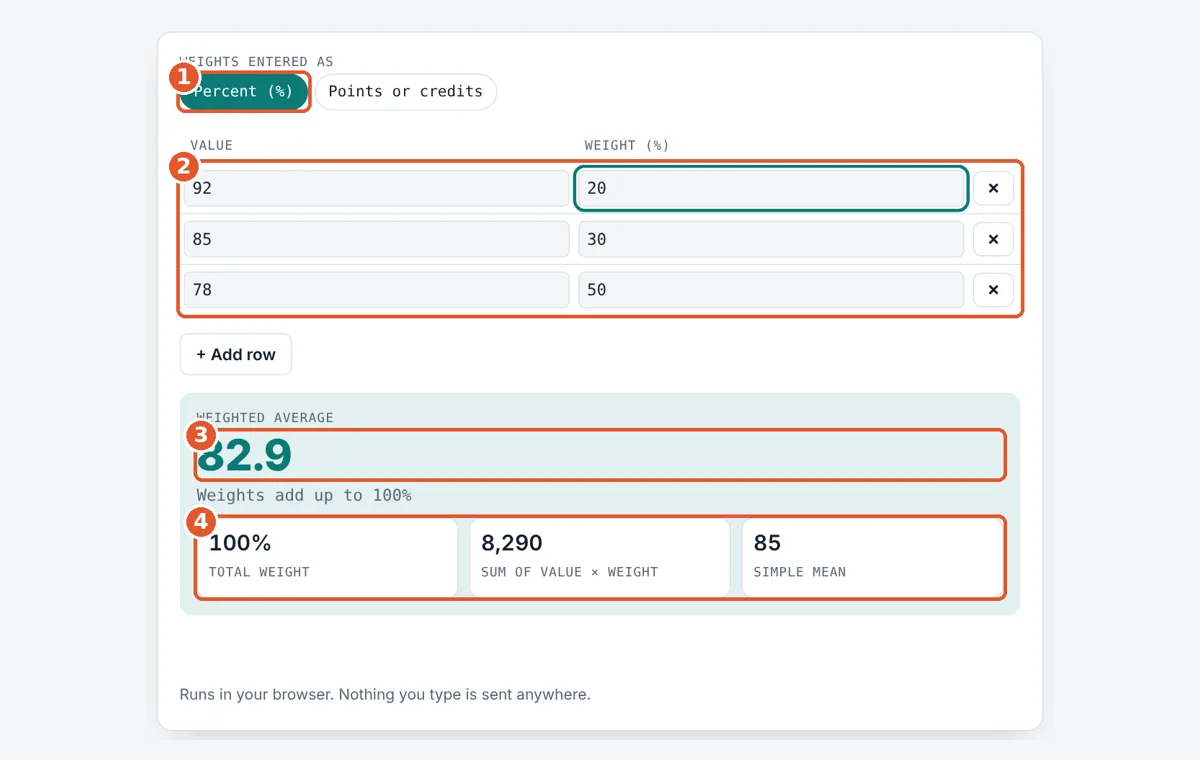
Choose percent or points
Pick Percent if your weights are percentages, or Points for credits and other units.
Enter values and weights
Type a value and its weight in each row. Use + Add row or × to change the rows.
Read the weighted average
The big number is the weighted average. The line below checks your weights.
Compare the totals
The boxes show the total weight, the sum of products and the plain mean.
Frequently Asked Questions
How do I calculate my grade with weighted categories?
Multiply each category score by its weight, add them, and divide by the total weight. Homework 92 at 20%, quizzes 85 at 30% and an exam 78 at 50% give (1,840 + 2,550 + 3,900) ÷ 100 = 82.9.
What happens if my weights add up to more than 100%?
The tool divides by whatever the weights add up to, so the answer stays a true weighted average. Weights of 20, 30, 50 and 25 total 125, and values of 92, 85, 78 and 60 give 9,790 ÷ 125 = 78.32.
Can a weight be zero?
Yes. A row with a weight of 0 adds nothing to the result, which is useful for an assignment not yet graded. At least one row must have a weight above 0, or the tool shows a message, because dividing by a total of 0 is impossible.
Is GPA a weighted average?
Yes. GPA weights each grade point by the course credit hours. Grades worth 4, 3 and 2 points in 3, 4 and 2 credit courses give (12 + 12 + 4) ÷ 9 = 3.11, which is lower than the plain mean of 3.
When is a weighted average equal to the normal average?
They are equal when every weight is the same, because each value then counts equally. Values 10 and 20 with weights of 1 and 1 give 15 either way. Any difference in weights moves the result toward the heavier value.
Can I use a weighted average for prices?
Yes. To find the average price paid, use the price as the value and the quantity as the weight. Buying 10 shares at $20 and 30 at $24 gives (200 + 720) ÷ 40 = $23 per share, not the plain $22.
Sources and Further Reading
- Wikipedia: Weighted arithmetic mean
- NIST/SEMATECH e-Handbook of Statistical Methods: Measures of Location
Related Tools
Last reviewed: October 2026