Type a file size in kilobytes and get megabytes using both rules at once: decimal (1 MB = 1,000 KB) and binary (1 MiB = 1,024 KiB). Switch direction to turn MB back into KB.
Runs in your browser. Nothing you type is sent anywhere.
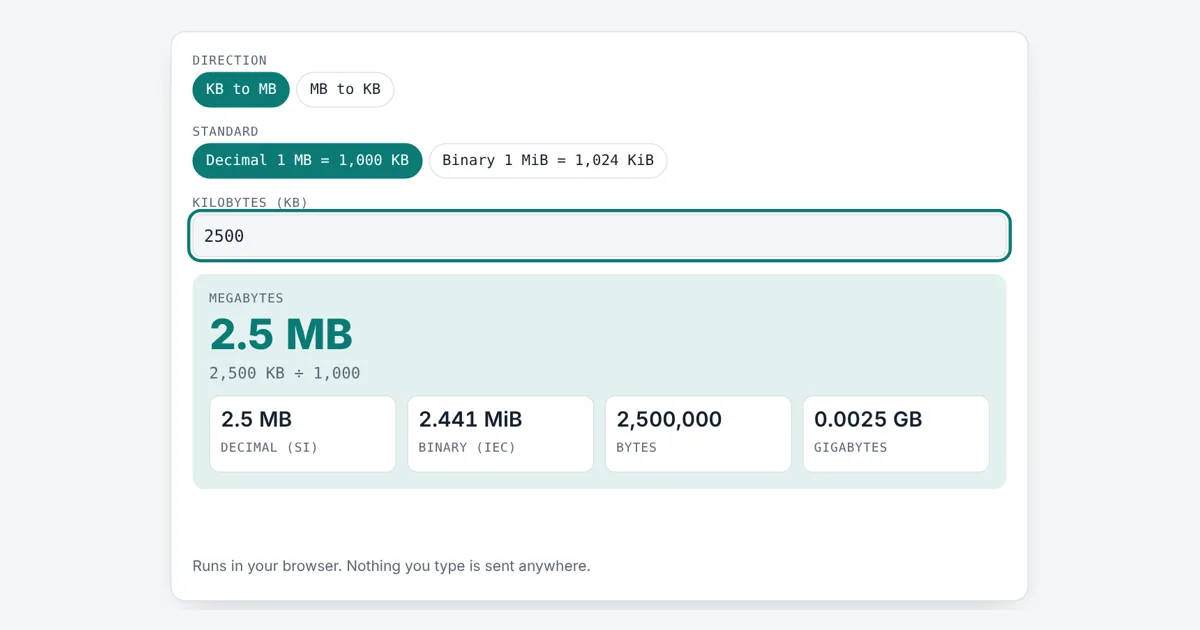
This kb to mb converter is for anyone checking a file against an upload limit, an email attachment cap or a storage plan. It shows the decimal answer that phone plans and drive makers use, and the binary answer that Windows shows, so you can see why two numbers for the same file can both be right.
How Do You Convert KB to MB?
To convert KB to MB, divide by 1,000 in the decimal system, so 2,500 KB is 2.5 MB. In the binary system, used by Windows and RAM, divide by 1,024 instead: 2,500 KiB is about 2.441 MiB. One MB is 1,000,000 bytes, while one MiB is 1,048,576 bytes.
How Many KB Are in a MB?
There are 1,000 KB in 1 MB in the decimal system, and 1,024 KiB in 1 MiB in the binary system.
Binary: MiB = KiB ÷ 1,024
Back again: KB = MB × 1,000, KiB = MiB × 1,024
A byte is 8 bits, the basic unit for file sizes. The kilobyte (kB, often written KB) is 1,000 bytes and the megabyte (MB) is 1,000,000 bytes, because the SI prefixes kilo and mega mean 10³ and 10⁶. NIST and the BIPM define these prefixes as powers of ten only.
What Is the Difference Between KB and KiB?
A KB is 1,000 bytes, while a KiB is 1,024 bytes, so a KiB is 2.4% bigger.
Computers work in powers of two, so memory sizes land on numbers like 1,024 (2¹⁰). For years people called 1,024 bytes a kilobyte too, which caused confusion. In 1998 the IEC (International Electrotechnical Commission) created binary prefixes to fix this: the kibibyte (KiB) is 1,024 bytes and the mebibyte (MiB) is 1,048,576 bytes. These are now part of the IEC 80000-13 standard. Windows File Explorer still shows binary sizes with the labels KB and MB, while macOS has used decimal sizes since 2009, so the same file can show a different number on each.
KB to MB Conversion Table
Values from this tool, rounded to 3 decimal places:
| Size | Decimal MB | Binary MiB |
|---|---|---|
| 100 KB | 0.1 MB | 0.098 MiB |
| 200 KB | 0.2 MB | 0.195 MiB |
| 500 KB | 0.5 MB | 0.488 MiB |
| 1,000 KB | 1 MB | 0.977 MiB |
| 1,024 KB | 1.024 MB | 1 MiB |
| 2,048 KB | 2.048 MB | 2 MiB |
| 5,000 KB | 5 MB | 4.883 MiB |
| 10,000 KB | 10 MB | 9.766 MiB |
| 102,400 KB | 102.4 MB | 100 MiB |
In the table, the binary column treats the input as KiB (1,024 bytes each).
Why Do Upload Limits Use KB and MB?
Upload forms state limits in KB or MB because they check the exact byte count of your file. A form that says “max 100 KB” may mean 100,000 bytes or 102,400 bytes, so aim a little under the limit to be safe. If a photo is too big, the resize image to 100KB tool shrinks it to fit, and the image compressor cuts the size of larger photos without changing their width and height.
Worked Example
A job site asks for a CV under 2 MB and your PDF shows 2,500 KB. Type 2500 with Decimal selected: the tool shows 2.5 MB, which is 2,500,000 bytes, so it is too big. In binary terms the same file is 2.441 MiB, still over the limit. Switch to MB to KB, type 3.5 and you get 3,500 KB, or 3,584 KiB with Binary picked. To shrink a photo for a strict form, use the 100KB image resizer.
How Do You Use the KB to MB Converter?
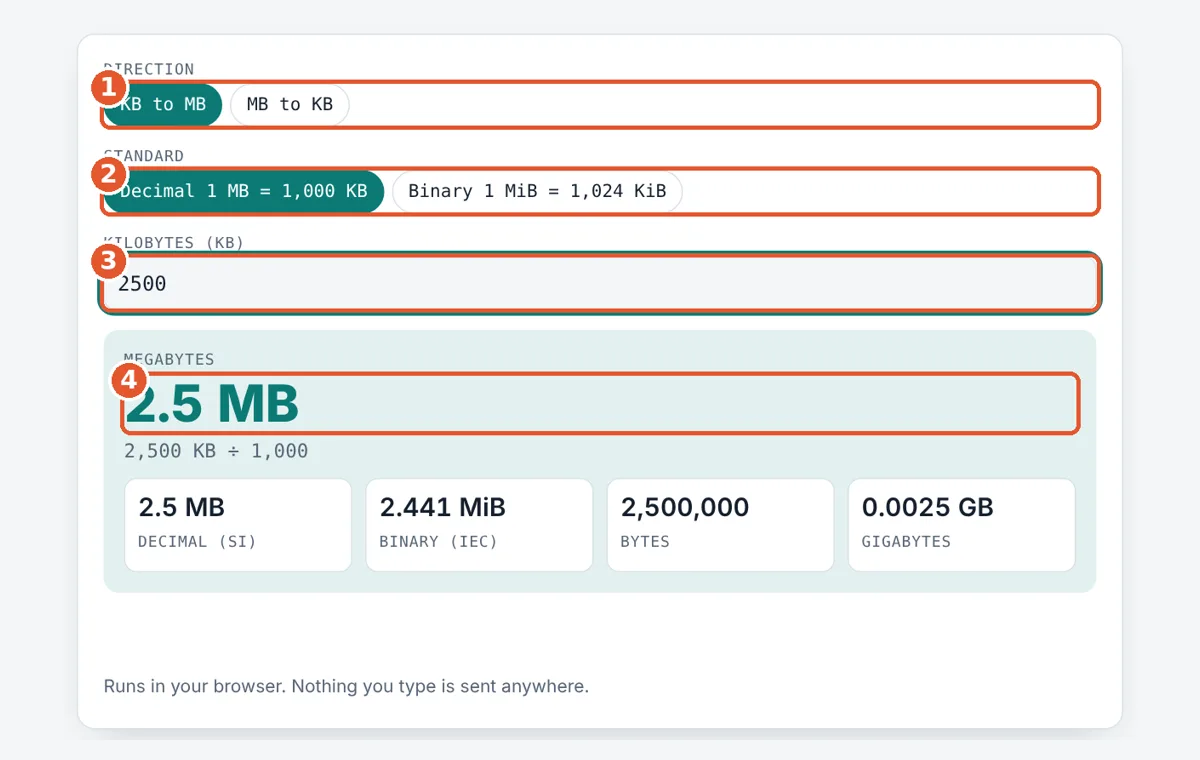
Pick a direction
Choose KB to MB, or MB to KB if you start from megabytes.
Choose the standard
Pick Decimal for drive makers and websites, or Binary for Windows and RAM sizes.
Type the size
Enter the number shown for your file. Decimals such as 512.5 work.
Read the result
The big number is your answer. The boxes show decimal, binary, bytes and gigabytes.
Frequently Asked Questions
Is 1 MB 1,000 or 1,024 KB?
Both are used. Under SI rules 1 MB is exactly 1,000 KB, or 1,000,000 bytes. Many computers count in binary, where 1 MiB is 1,024 KiB, or 1,048,576 bytes. Windows labels the binary value as MB, which causes the mix up.
How many MB is 500 KB?
500 KB is 0.5 MB in decimal units. In binary units, 500 KiB is about 0.488 MiB. Either way it is about half a megabyte, small enough for most email and web upload limits.
How many KB is 1 MB?
1 MB is 1,000 KB in decimal units. 1 MiB is 1,024 KiB in binary units. If a form asks for a file under 1 MB, keeping it under 1,000 KB is safe for both rules.
What does KiB mean?
KiB is the symbol for kibibyte, a binary unit equal to 1,024 bytes. The IEC added it in 1998 so that KB could keep its SI meaning of 1,000 bytes. MiB, the mebibyte, is 1,024 KiB.
Why does Windows show a smaller MB number than my phone?
Windows divides by 1,024 but still writes MB, while macOS, iOS and Android usually divide by 1,000. A 5,000,000 byte file is 5 MB on a phone but about 4.77 MB in Windows File Explorer.
Is kB or KB the correct symbol?
The SI symbol is kB with a lowercase k, because capital K means kelvin. KB with a capital K is very common in software and on websites, and it nearly always means kilobyte. KiB is the clear binary form.
Sources and Further Reading
- NIST: Prefixes for binary multiples (KiB, MiB, GiB)
- NIST: SI prefixes and powers of ten
- BIPM: The International System of Units (SI Brochure)
Related Tools
Last reviewed: October 2026