Create up to 500 UUIDs at once, either fully random version 4 or time ordered version 7, then copy them in lowercase, uppercase or without hyphens.
Runs in your browser with its secure random generator. Nothing is sent or stored.
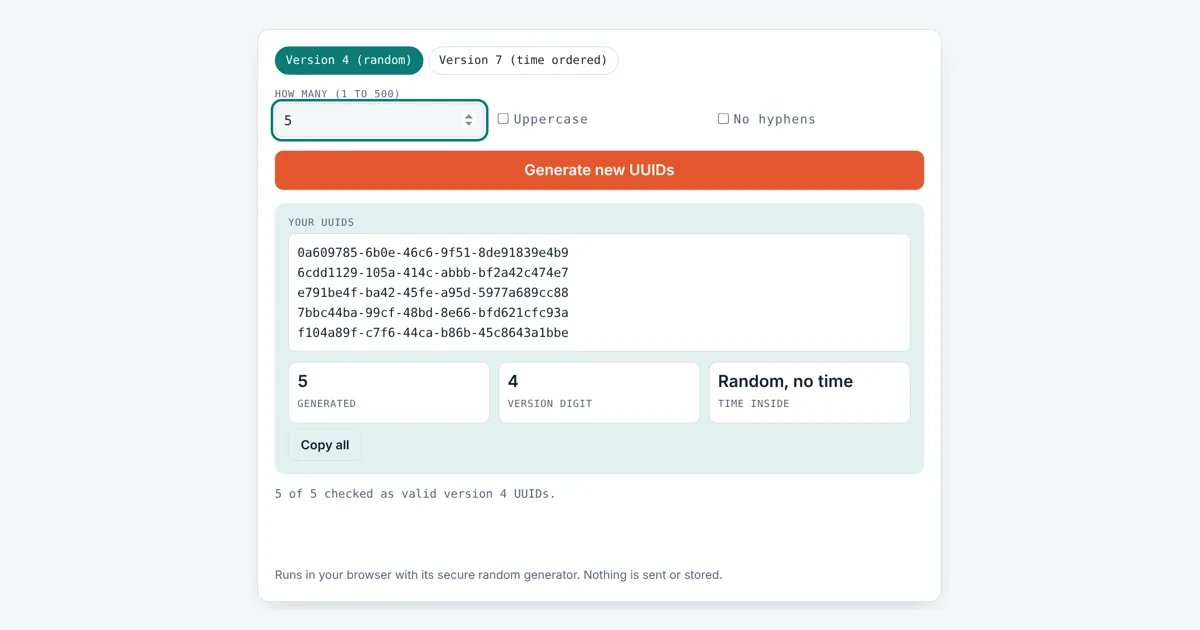
This uuid generator is for developers, testers and database admins who need unique IDs for records, test data, API keys or file names. It builds each ID in your browser with the Web Crypto secure random generator and checks every one against the version and variant bits before showing it.
What Is a UUID and How Is It Generated?
A UUID is a 128-bit identifier written as 32 hex digits in five groups, 8-4-4-4-12, such as 3f2b8c1e-9a4d-4e7b-b2c5-1d8e6f0a9b3c. A version 4 UUID fills 122 bits with random data and fixes 6 bits for the version and variant, giving about 5.3 × 10^36 possible values.
What Is the Difference Between UUID v4 and v7?
A version 4 UUID is completely random, while a version 7 UUID starts with the current time in milliseconds, so v7 IDs sort in the order they were created.
Both are defined in RFC 9562, the 2024 standard that replaced RFC 4122. In a v7 UUID the first 48 bits are the Unix epoch time in milliseconds, then 4 version bits, 12 bits of counter or random data, 2 variant bits and 62 random bits. Because new IDs are always larger than older ones, a database B-tree index stays compact, which is why v7 is popular as a primary key. In this tool the 12 bits after the version act as a counter, so IDs made in the same millisecond still sort in order. The tool shows the time stored inside the first v7 UUID; you can check it with our Unix timestamp converter.
| Field | Version 4 | Version 7 |
|---|---|---|
| Bits 0 to 47 | random | Unix time, ms |
| Bits 48 to 51 | 0100 (4) | 0111 (7) |
| Bits 52 to 63 | random | counter or random |
| Bits 64 to 65 | 10 (variant) | 10 (variant) |
| Bits 66 to 127 | random | random |
| Random bits | 122 | up to 74 |
| Sortable by time | no | yes |
How Do You Spot the UUID Version?
You spot the version from the first digit of the third group: a 4 there means version 4 and a 7 means version 7.
The first digit of the fourth group shows the variant and is always 8, 9, a or b for standard UUIDs. The Nil UUID, all zeros, and the Max UUID, all f, are special values. Microsoft tools often call a UUID a GUID; it is the same format.
Can Two UUIDs Ever Be the Same?
Two random v4 UUIDs can in theory match, but the odds are so small that you would need about 2.7 × 10^18 of them for a 50% chance of a single duplicate.
That figure comes from the birthday problem with 2^122 possible values. Safety depends on a good random source, so this generator uses crypto.getRandomValues and crypto.randomUUID from the Web Crypto API, never Math.random. UUIDs are unique, not secret, so do not use them alone as passwords. For a secret, use the password generator, and for plain numbers try the random number generator.
Worked Example
A tester needs 5 IDs for sample orders. With Version 4 and 5 selected, the tool lists five IDs such as 3f2b8c1e-9a4d-4e7b-b2c5-1d8e6f0a9b3c, each with a 4 at the start of the third group, and confirms “5 of 5 checked as valid version 4 UUIDs”. Switching to Version 7 gives IDs that start with the same 12 hex digits when made in the same millisecond, such as 01a124c6-5c4c-711f-aa97-bee04454e1ee for an ID made on 10 October 2026, and the Time of first box shows the UTC time read back from the ID. Ticking No hyphens turns each one into 32 characters for systems that reject dashes.
How Do You Use the UUID Generator?
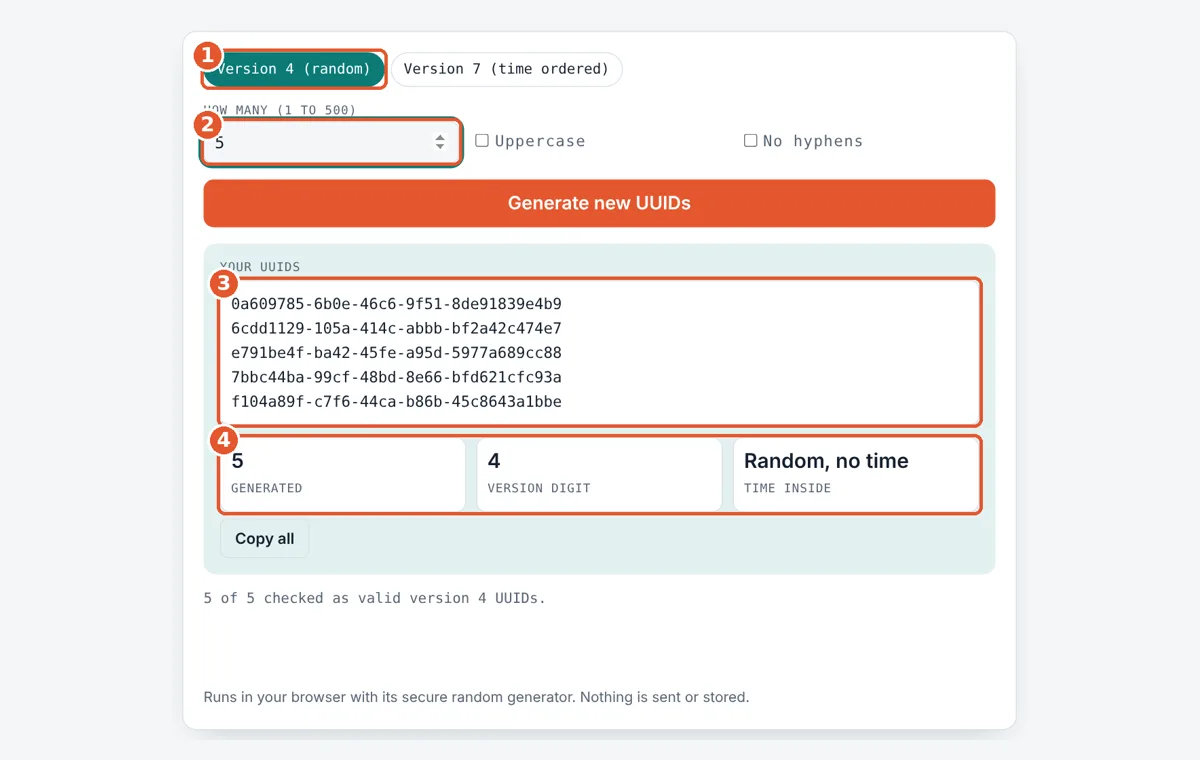
Pick the version
Choose Version 4 for fully random IDs or Version 7 for IDs that sort by time.
Set how many
Enter a number from 1 to 500. The list refreshes as you type.
Choose the format
Tick Uppercase or No hyphens if your system needs that style, then press Generate for a new batch.
Copy the list
Check the version digit and time boxes, then press Copy all to copy every UUID, one per line.
Frequently Asked Questions
Is a UUID the same as a GUID?
Yes. GUID, short for globally unique identifier, is the name Microsoft uses for the same 128-bit format. A GUID and a UUID both have 32 hex digits in the 8-4-4-4-12 layout and follow the same standard.
Which UUID version should I use for a database key?
Version 7 is usually the better choice for primary keys because new IDs sort after older ones, so inserts stay at the end of the index. Use version 4 when you do not want creation time visible in the ID.
Does a version 7 UUID reveal when it was made?
Yes. The first 48 bits hold the creation time in milliseconds since 1 January 1970 UTC. Anyone with the ID can read that time, which this tool shows in the Time of first box.
How many characters is a UUID?
A UUID is 36 characters with hyphens: 32 hex digits plus 4 hyphens. Without hyphens it is 32 characters. Stored as raw binary it takes 16 bytes.
Are uppercase UUIDs valid?
Yes. RFC 9562 says the letters in a UUID may be all uppercase, all lowercase or mixed, and the value is the same. Lowercase is the most common style, so pick Uppercase only if the system you paste into expects it.
Are these UUIDs safe to use in production?
They are made with the browser's cryptographic random generator, the same source used for security keys, and each is checked for the right version and variant bits. They are created on your device and never sent anywhere.
Sources and Further Reading
- IETF RFC 9562: Universally Unique IDentifiers (UUIDs)
- MDN Web Docs: Crypto.randomUUID()
- MDN Web Docs: Crypto.getRandomValues()
Related Tools
Last reviewed: October 2026